
Lynx Launcher is said to be “inspired” by the Linux-based Gnome desktop interface, but even if you aren’t a card-carrying computer geek, there’s plenty to like about its frills-free home screen setup. At its core, Lynx Launcher gives you a single primary home screen panel with a simple built-in clock widget at its top and a row of favorite apps on its right side. You can add any additional shortcuts and widgets you want into that main area as well, but it seems designed to be relatively sparse and open.
That’s in large part because of Lynx’s series of distinctive elements that exist around that primary panel:
- With a swipe to the right — or a tap on the nine-dot icon within the favorites dock on the main screen — you zip over to Lynx’s lovely alphabetical app drawer, which makes it delightfully fast and easy to find what you need.
- With a swipe to the left, you pull up a self-populating Favorites screen. It automatically fills itself up with your most frequently used apps and contacts for especially speedy access.
- With a swipe downward on any home screen panel — or a tap on the search box at the top of your home screen — you launch Lynx’s swift search system. There, you can quickly find any app or contact on your phone by typing in a letter or two, and you can also perform a standard web search by typing out the full term and then selecting the “Search on Google” (or any alternate search engine you choose) option.
- Finally, with a swipe up on any area of your home screen, you summon Lynx’s “Desktop” area. It’s basically an extra on-demand home screen panel where you can store any combination of shortcuts and widgets for easy ongoing access without having ’em constantly in your face.
The Linux-inspired Lynx Launcher has a sleek and simple primary home screen (at left) with some unusual elements around it, including an especially effective and easy-to-use app drawer (at right).
JR Raphael / Foundry
Lynx packs plenty of customization options, too, ranging from details of the launcher’s appearance to more functional changes related to which interface elements are and aren’t present and how exactly they work. And it sports a host of custom gestures you can set for launching apps or performing system functions with all sorts of different swipes, if you want to go down that road.
Lynx is free to use in its base form with an optional $4 pro upgrade to unlock some of the more advanced customization possibilities.
In short: Whether you love Linux or just appreciate a sleek, simple setup with plenty of practical touches, Lynx Launcher is an unconventional Android home screen contender that’s well worth your while to try.
Speaking of simplicity, ever feel like you’re spending too much time on your phone? Before Launcher is all about giving you a minimalist, no-frills home screen for distraction-free productivity — a setup its creators claim can help you open your phone a whopping 40% less than you do now.
Before’s primary home screen panel is a plain-as-can-be text-based list of your most frequently accessed apps, with not a single icon or eye-catching flourish to be found. If you need to get to something else, you can find a complete list of installed programs one panel over to the right. And to the left sits a filtered notification drawer that can hide low-priority notifications and make ’em available only when you actively opt to seek ’em out.
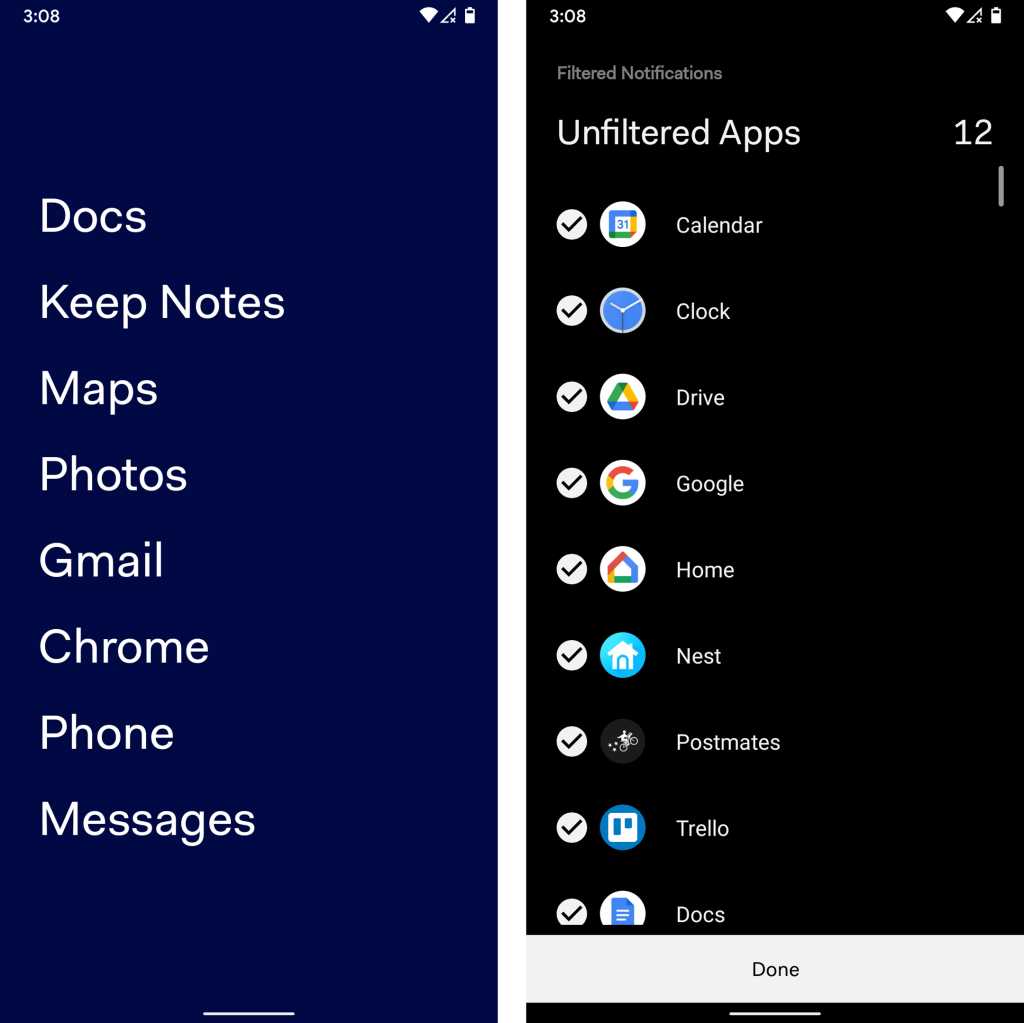
From the plain-text primary home screen to the built-in notification filtering system, less really is more with the understated Before Launcher.
JR Raphael / Foundry
Before has some simple options for customizing the appearance of your home screen and creating a couple of custom gestures, but it’s all pretty barebones and basic by design. The launcher also offers an optional $7 Pro upgrade that adds in a handful of more advanced features, including a custom folder and label system for apps and the ability to hide apps entirely out of view.
In short: If you want the utmost in simplicity and a setup that keeps distractions almost entirely out of sight, Before Launcher is just what the minimalist ordered.
This article was originally published in June 2019 and most recently updated in December 2025.
Read the full article here