

SUBSCRIBE
Tech Journal Now
  • Home
  • News
  • AI
  • Reviews
  • Guides
  • Best Buy
  • Software
  • Games
  • More Articles
Reading: Become a power user – GeekWire
Share
Tech Journal NowTech Journal Now
Font ResizerAa
  • News
  • Reviews
  • Guides
  • AI
  • Best Buy
  • Games
  • Software
Search
  • Home
  • News
  • AI
  • Reviews
  • Guides
  • Best Buy
  • Software
  • Games
  • More Articles
Have an existing account? Sign In
Follow US
© Foxiz News Network. Ruby Design Company. All Rights Reserved.
Tech Journal Now > News > Become a power user – GeekWire
News

Become a power user – GeekWire

News Room
Last updated: August 16, 2026 11:28 pm
News Room
Share
8 Min Read
SHARE
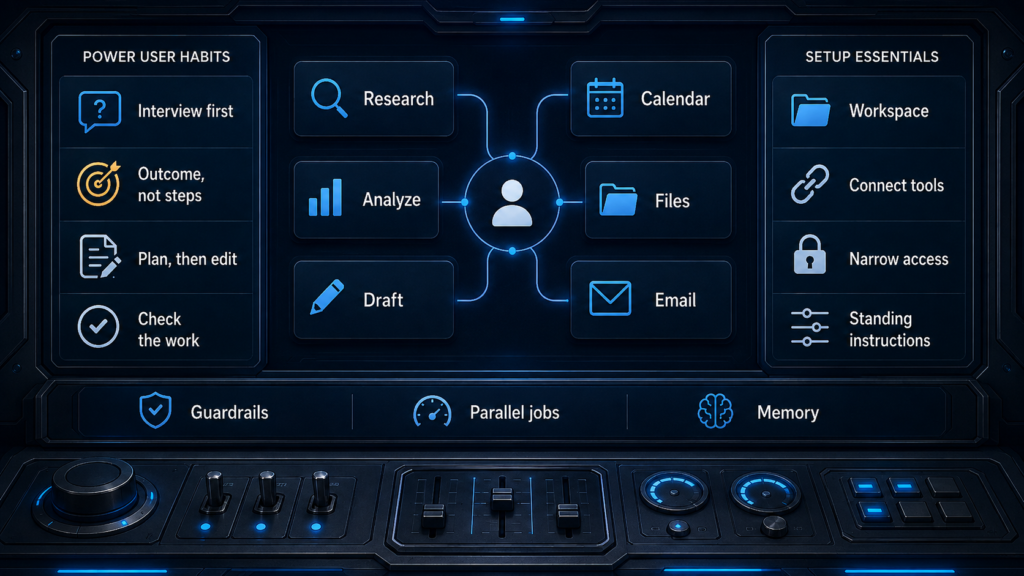
Some of the habits and settings that separate AI power users from everyone else. (Illustration by GPT-5.6 Sol)

Your first step toward becoming an AI Power User is to adopt a few hacks, most of which only take a minute to implement.  My favorites are below.  There’s a lot here, so you can pick and choose.  Or you can embrace my meta-hack: I told Claude to help me deploy all of them.

Let’s dig in.

My Ten Favorite Hacks

Let AI interview you. Write a short prompt, then ask to be interrogated about tradeoffs, edge cases, and scope. The interview will surface requirements you might miss.

“I need to redesign our onboarding. Before you do anything, interview me: ask about constraints, edge cases, and what I’m assuming that I shouldn’t be. Keep going until you have what you need, then write the spec.”

Describe the outcome, not the steps. Say what should exist when it’s done, who will read it, and what it’s for; let the AI figure out ‘how’ — that’s its job.

Make AI plan first, then edit the plan. Fixing a plan costs you a paragraph; fixing a finished deliverable costs you the whole run.

Give AI a way to grade itself. Hand it a rule or a checklist that returns a pass or a fail. Then it keeps working until it passes, instead of stopping at the first thing that looks done.

“Here’s the checklist this memo has to pass: every number traceable to the source file, no claim without a citation, under two pages.”

Demand citations, then check each one. Require a citation for every claim and tell it to flag what it couldn’t verify instead of filling the gap. Then carefully review every single one, because a fabricated citation looks exactly like a real one.

Test it on something you already know the answer to. Before you trust it on work you can’t check, give it a task you can grade. That’s how you learn where it’s strong and where it’s bluffing.

Ask for options, then make it argue against itself. One answer reads as authoritative whether or not it’s right. Three answers and a rebuttal give you something to judge.

“Give me three ways to structure the launch. Then critique each one.”

Steer while AI is running. Redirect the job the moment you see it’s misunderstood you, instead of waiting to reject the finished product.

Run long jobs in parallel. Start the 10-minute research task and go get coffee or start a second job and alternate between the two. Either way the results are waiting for you instead of you waiting for the results.

Calibrate the effort to the task.  Keep quick lookups in a simple chat (Google is the fastest), or using a lighter-weight model. Running the most powerful agent on a question that Google can settle burns time and credits you’ll want later.

Notice what these hacks have in common: each one happens while you’re working. Change what you do inside the task, and the results improve.  To level up your prompts, check out my earlier GeekWire column.

The next ten hacks are about your setup and standing rules; many people miss these gems because the payoff is delayed. You spend twenty minutes on a Tuesday configuring something, and the return shows up in small increments over the following months.

Ten Setup Hacks

Give AI a persistent workspace. Keep the files, standing instructions and history for one body of work in one place.

Connect it to the tools you use. Calendar, drive, inbox. The setup takes ten minutes, and afterward it works from your real material instead of whatever you remember to paste.

Grant the narrowest access the job needs. A hostile instruction hidden in a web page or an email can be read as though you typed it, and it can only act through the tools you’ve already handed over. A research task with web access alone is a far smaller target than the same task holding your files and your inbox.

Put standing preferences in settings, not in prompts. If you retype “be concise, no bullet points, write like a person” at the top of every request, you’re doing work the settings page will do once.

Decide once what AI may never do on your behalf. Write down the two or three lines that matter: don’t send anything, and don’t delete files. Put them in your standing instructions instead of remembering them prompt by prompt.

Talk instead of typing. Turn dictation on once. You speak about 3x faster than you type, and because talking is cheap you’ll ramble out the background and caveats you’d never bother typing, which is usually the context that was missing.

Turn anything you do repeatedly into a skill. Save the instructions for a task you repeat, whether a house style, a review checklist or a report format, so you stop rebuilding it from memory.

Schedule recurring work, but only after the prompt is proven. Get the output right by hand first, because a mediocre prompt on a schedule is a mediocre output every week forever.

Set your rule at two failed corrections. A fresh session with a better opening prompt beats a long thread cluttered with everything that already didn’t work.

Let AI remember you, then read what it remembered. Memory makes it useful faster, and a wrong memory quietly degrades every answer after it, so audit the list once a quarter.

The models keep getting better, so some of these hacks will be obsolete before long. Here’s something that won’t change in the foreseeable future. AI generates more options than you can read. What it lacks is judgment: it can’t tell you which one is right. That call is yours. Sometimes the best move is to skip AI entirely.

Never fall asleep and let AI take the steering wheel.

Caveat promptor: let the prompter beware.

For Further Reading

My lists are distilled from the guidance the labs publish themselves. The first two sources carry most of what is above; the rest are worth a look if a particular habit is one you want to go deeper on.

Read the full article here

You Might Also Like

How EVP Charles Lamanna is helping turn Microsoft into the ‘Copilot company’ – GeekWire

How KEXP’s new tech chief will amplify human connection – GeekWire

Most popular stories on GeekWire for the week of June 21, 2026 – GeekWire

UW’s Allen School names Dan Grossman interim director as Magdalena Balazinska shifts gears – GeekWire

‘SF beats us because they invest off of vibes’ – GeekWire

Share This Article
Facebook Twitter Email Print
Leave a comment Leave a comment

Leave a Reply Cancel reply

Your email address will not be published. Required fields are marked *

- Advertisement -
Ad image

Trending Stories

Games

Request for comment: Which way did you go when you reached the controversial ending of Mass Effect 3?

August 17, 2026
Games

The Quake community simply cannot stop delivering, having just released a 22-map ‘Deathmatch Jam’ to celebrate the shooter’s 30th birthday

August 16, 2026
Games

Marvel Tōkon’s simple but effective combo trials are an elegant tutorial solution that I wish more fighting games had

August 16, 2026
Games

League of Legends YouTuber unearths the original investor pitch from when the game was called Onslaught: War of the Immortals

August 16, 2026
Games

Where’s the weirdest place you’ve heard videogame music?

August 16, 2026
News

Most popular stories on GeekWire for the week of Aug. 9, 2026 – GeekWire

August 16, 2026

Always Stay Up to Date

Subscribe to our newsletter to get our newest articles instantly!

Follow US on Social Media

Facebook Youtube Steam Twitch Unity

2024 © Prices.com LLC. All Rights Reserved.

Tech Journal Now

Quick Links

  • Privacy Policy
  • Terms of use
  • For Advertisers
  • Contact
Welcome Back!

Sign in to your account

Username or Email Address
Password

Lost your password?