

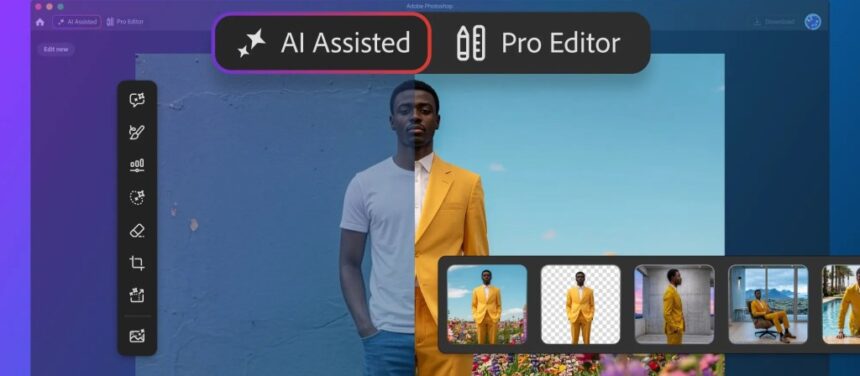
Adobe has added a simplified editing mode to Photoshop designed to help new users get acquainted with the popular image editing app.
AI Assisted Editor, now available in beta, is an optional alternative to the standard view — now called Pro Editor mode — that provides a prompt-based interface similar to the Firefly editor rather than the full range of Photoshop tools. It includes a side panel that contains generative AI (genAI) features such as Generative Fill, Remove Background, and AI Markup, as well as a text prompt box.
The more streamlined editor view could also prove useful for existing users that don’t need the full workspace for every edit, Adobe said. More seasoned professionals might switch to the AI Assisted Editor for concepts or mock ups, or for quick editing that doesn’t require the full set of Photoshop functions.
For those who don’t need it, however, the new mode can be hidden from view.
Among the other Photoshop features unveiled Thursday is Prompt to Edit, which lets users apply changes to an entire image with a simple prompt — for example, adding stormy clouds and rain. That creates an output layer that can then be modified, such as masking out image elements or changing the opacity.
Prompt to Edit is available in both AI Assisted and Pro Editor views.
A new “markup” feature lets users “visually communicate” edits to Firefly by drawing onto an image, indicating areas to recolor, for instance. This makes it easier to direct the AI model compared to text prompts. The Instruct Edit with Masks, which relies on Firefly Image 5, lets users specify what elements of an image to change with text prompts, with unmasked areas left untouched.
Other updates include Light Adjustment Layer, which provides “professional-grade” lighting controls, such as exposure, contrast and shadows, in a non-destructive adjustment layer, Adobe said. A Stock Panel integration provides access to more than 900 million Adobe Stock assets in Photoshop via a dockable panel, while another addition, Dynamic Text, Shapes and Paths, automatically adapts text along curves as freeform layouts.
Read the full article here