


SUBSCRIBE
Tech Journal Now
  • Home
  • News
  • AI
  • Reviews
  • Guides
  • Best Buy
  • Software
  • Games
  • More Articles
Reading: 10 cool things Copilot can do in PowerPoint
Share
Tech Journal NowTech Journal Now
Font ResizerAa
  • News
  • Reviews
  • Guides
  • AI
  • Best Buy
  • Games
  • Software
Search
  • Home
  • News
  • AI
  • Reviews
  • Guides
  • Best Buy
  • Software
  • Games
  • More Articles
Have an existing account? Sign In
Follow US
© Foxiz News Network. Ruby Design Company. All Rights Reserved.
Tech Journal Now > AI > 10 cool things Copilot can do in PowerPoint
AI

10 cool things Copilot can do in PowerPoint

News Room
Last updated: July 22, 2026 11:28 am
News Room
Share
4 Min Read
SHARE

In the Copilot pane, just type “summarize this presentation.” You can also have Copilot flag key slides that contain important information: “show me key slides.”

Ask Copilot to summarize a presentation or flag key slides.

Howard Wen / Foundry

8. Answer questions about a presentation

As you’re reviewing a presentation, especially one that you didn’t create and are not familiar with, you can get Copilot to pull key data points from its slides.

In the Copilot pane, type specific informational questions. Examples:

  • What are the action items in this deck?
  • What is the proposed budget mentioned here?

If Copilot can’t find the exact answer to the question you ask, it will provide related information from the presentation.
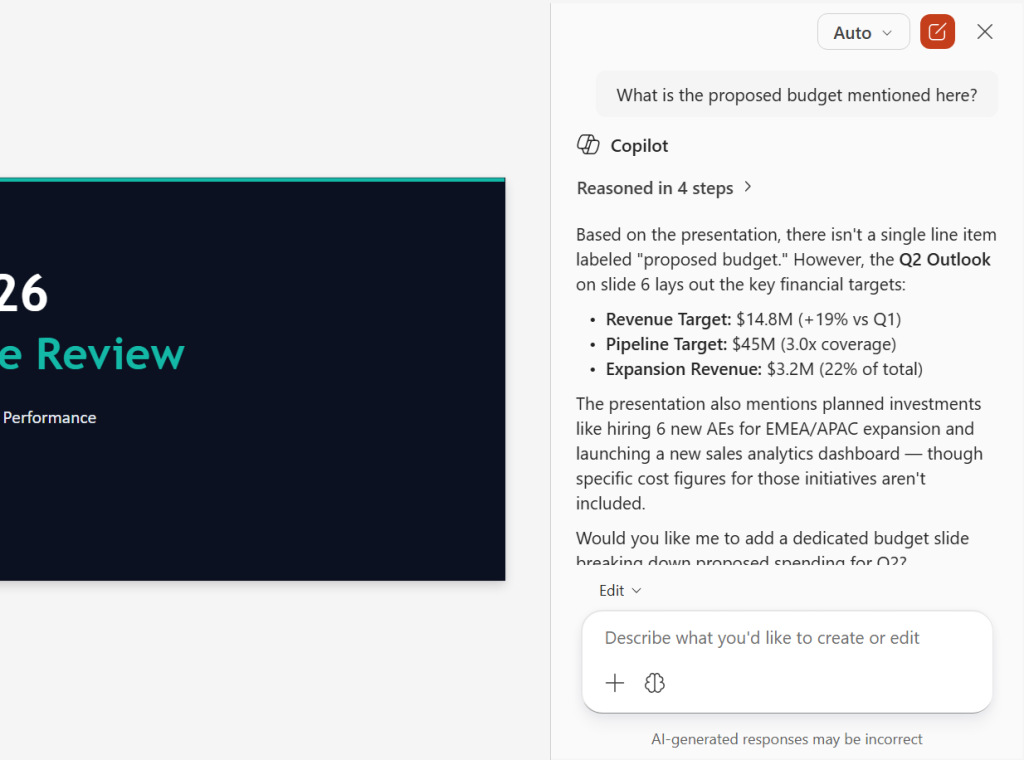
screenshot of copilot sidebar in powerpoint with response to query about proposed budget in the slide deck

Ask Copilot specific questions about the contents of a presentation.

Howard Wen / Foundry

This method can also help you validate that your presentation includes everything you want it to. If you ask Copilot about the action items in a presentation and it can’t find any, you know you need to add them. (Copilot will likely offer to generate them for you based on the rest of the slides.)

You can even take this tactic a step further and ask Copilot if the presentation is missing any important data, if any slides are weak or confusing, if there are any awkward transitions, if there are key points that should be better emphasized, and so on.

9. Help you navigate a large presentation

In the business world, presentations with dozens of slides are not uncommon, such as for financial reports or project documentation. Trying to find a specific slide or multiple slides can be tough. Copilot can help you navigate such a presentation.

In the Copilot pane, prompt Copilot to find slides based on specific topics. Example:

  • Show me the slides about the project timeline.

Copilot will analyze the presentation and reply with a list of links to the relevant slides. Click one of these to jump directly to that slide.
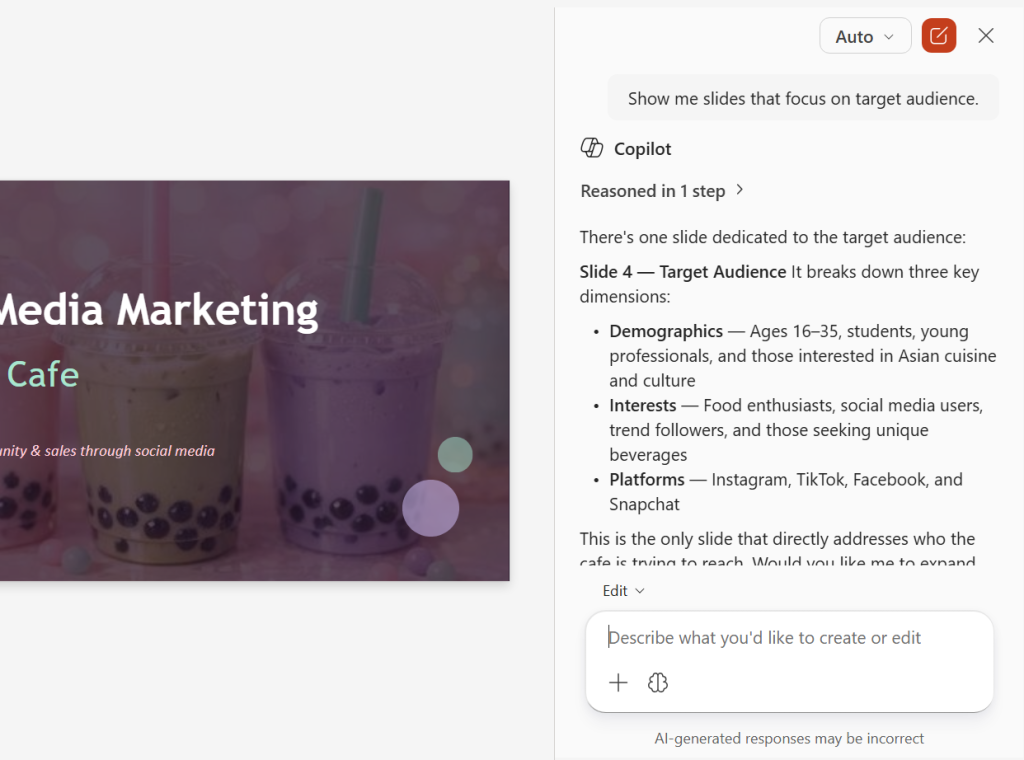
screenshot of copilot sidebar in powerpoint with response about the slide that talks about target audience

Copilot can help you zoom directly to a slide that covers a particular topic or shows specific data.

Howard Wen / Foundry

10. Generate speaker notes and/or an FAQ

Here’s a great timesaver when you’re preparing to show your presentation to an audience: Copilot can automatically generate suggested speaker notes for you, based on the content of your slides. Example prompt:

  • Write speaker notes for every slide with one talking point per slide.
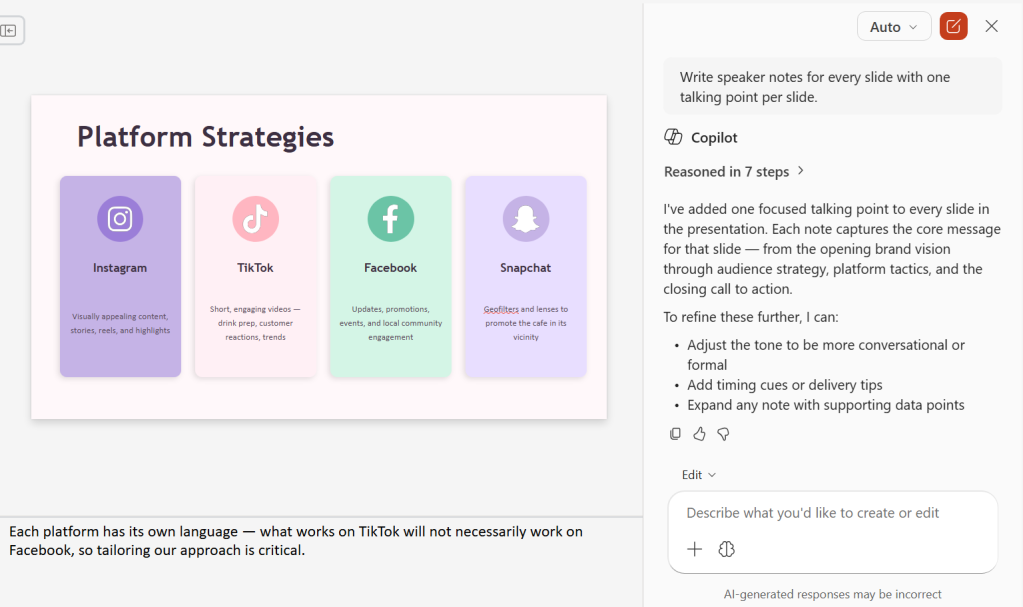
screenshot of powerpoint presentation with speaker notes generated by copilot

Copilot can create speaker notes in seconds.

Howard Wen / Foundry

In a related feature, Copilot can create a frequently asked questions list (FAQ) for you to consult in your speaker notes or to present as a slide:

  • Write an FAQ for these slides.

Copilot will ask where you want the questions and answers added — as a new slide at the end, integrated into the speaker notes of relevant slides, or somewhere else that you designate. Make a selection, and Copilot will generate the FAQ based on the content of your presentation.
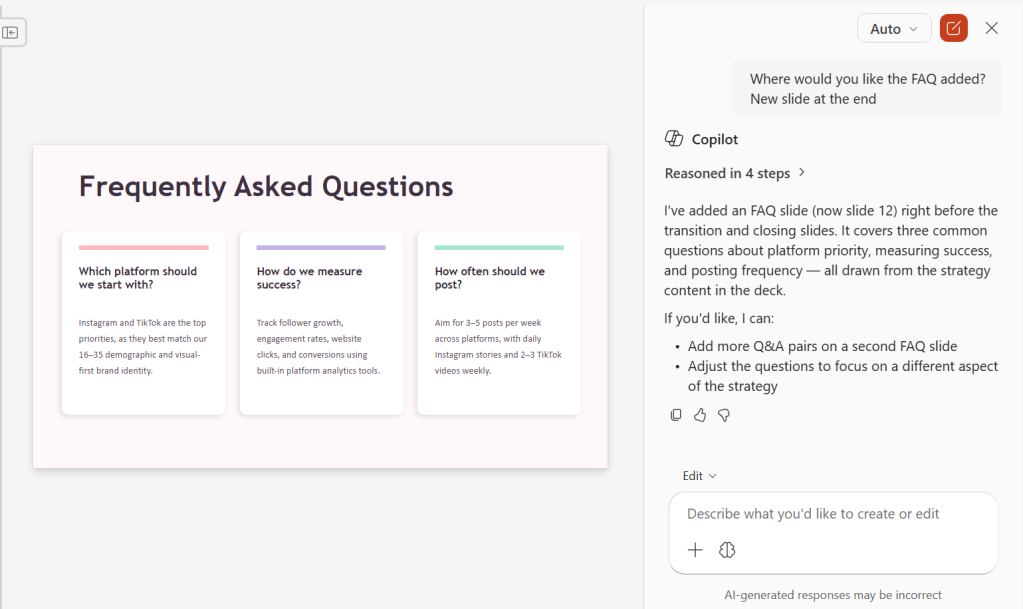
screenshot of frequently asked questions slide generated by copilot in powerpoint

A Copilot-generated FAQ slide.

Howard Wen / Foundry

Related reading:

Read the full article here

You Might Also Like

Anthropic accuses Alibaba of using 25,000 fake accounts to scrape Claude AI – Computerworld

Why I’m leaving Copilot for Gemini – Computerworld

Did AI decide who lost their jobs? Meta is heading to court over that question

Apple to open its first developer center in Europe – Computerworld

6.4 hours a week babysitting bots – Computerworld

Share This Article
Facebook Twitter Email Print
Leave a comment Leave a comment

Leave a Reply Cancel reply

Your email address will not be published. Required fields are marked *

- Advertisement -
Ad image

Trending Stories

News

Game developer Harebrained Schemes kicks off its new indie era with survival-horror RPG ‘GRAFT’ – GeekWire

July 22, 2026
Games

Star Wars Zero Company’s story ‘is a linear one from beginning to end’, Bit Reactor says, so don’t expect branching paths or romance options

July 22, 2026
News

Amazon cuts jobs in AGI group as it puts more focus on customer-facing AI – GeekWire

July 22, 2026
Games

Faker becomes an honorary Korean police officer to help discourage online gambling

July 22, 2026
News

Open-source DGML format aims to turn docs into data that AI (and humans) can trust – GeekWire

July 22, 2026
Games

Microsoft is bringing original Xbox exclusives to PC for the first time, starting with four ‘classic games’

July 22, 2026

Always Stay Up to Date

Subscribe to our newsletter to get our newest articles instantly!

Follow US on Social Media

Facebook Youtube Steam Twitch Unity

2024 © Prices.com LLC. All Rights Reserved.

Tech Journal Now

Quick Links

  • Privacy Policy
  • Terms of use
  • For Advertisers
  • Contact
Welcome Back!

Sign in to your account

Username or Email Address
Password

Lost your password?