SUBSCRIBE
Tech Journal Now
  • Home
  • News
  • AI
  • Reviews
  • Guides
  • Best Buy
  • Software
  • Games
Reading: Where to find the terminals and tagged containers to complete Protect/Destroy 4 in Marathon
Share
Tech Journal NowTech Journal Now
Font ResizerAa
  • News
  • Reviews
  • Guides
  • AI
  • Best Buy
  • Games
  • Software
Search
  • Home
  • News
  • AI
  • Reviews
  • Guides
  • Best Buy
  • Software
  • Games
Have an existing account? Sign In
Follow US
© Foxiz News Network. Ruby Design Company. All Rights Reserved.
Tech Journal Now > Games > Where to find the terminals and tagged containers to complete Protect/Destroy 4 in Marathon
Games

Where to find the terminals and tagged containers to complete Protect/Destroy 4 in Marathon

News Room
Last updated: March 10, 2026 2:44 pm
News Room
Share
4 Min Read
SHARE

MIDA’s Protect/Destroy 4 quest in Marathon sends you to Outpost, the most difficult and confusing of the three base maps. You don’t really get a second to take a look around, which is problematic when you need to find terminal locations and scan tagged containers in three different spots. Plus, it also takes bloody ages to run around the map, and you’ve only got 20 minutes to complete all three steps and extract.

But don’t worry, I’ll save you from the pain of getting shot while you’re carelessly running around looking for the objectives. Well, I can’t promise you won’t get shot in the back, but knowing where to look will help you complete Protect/Destroy 4 in no time.

Download the shipping manifest in Processing

Image 1 of 2
(Image credit: Bungie)

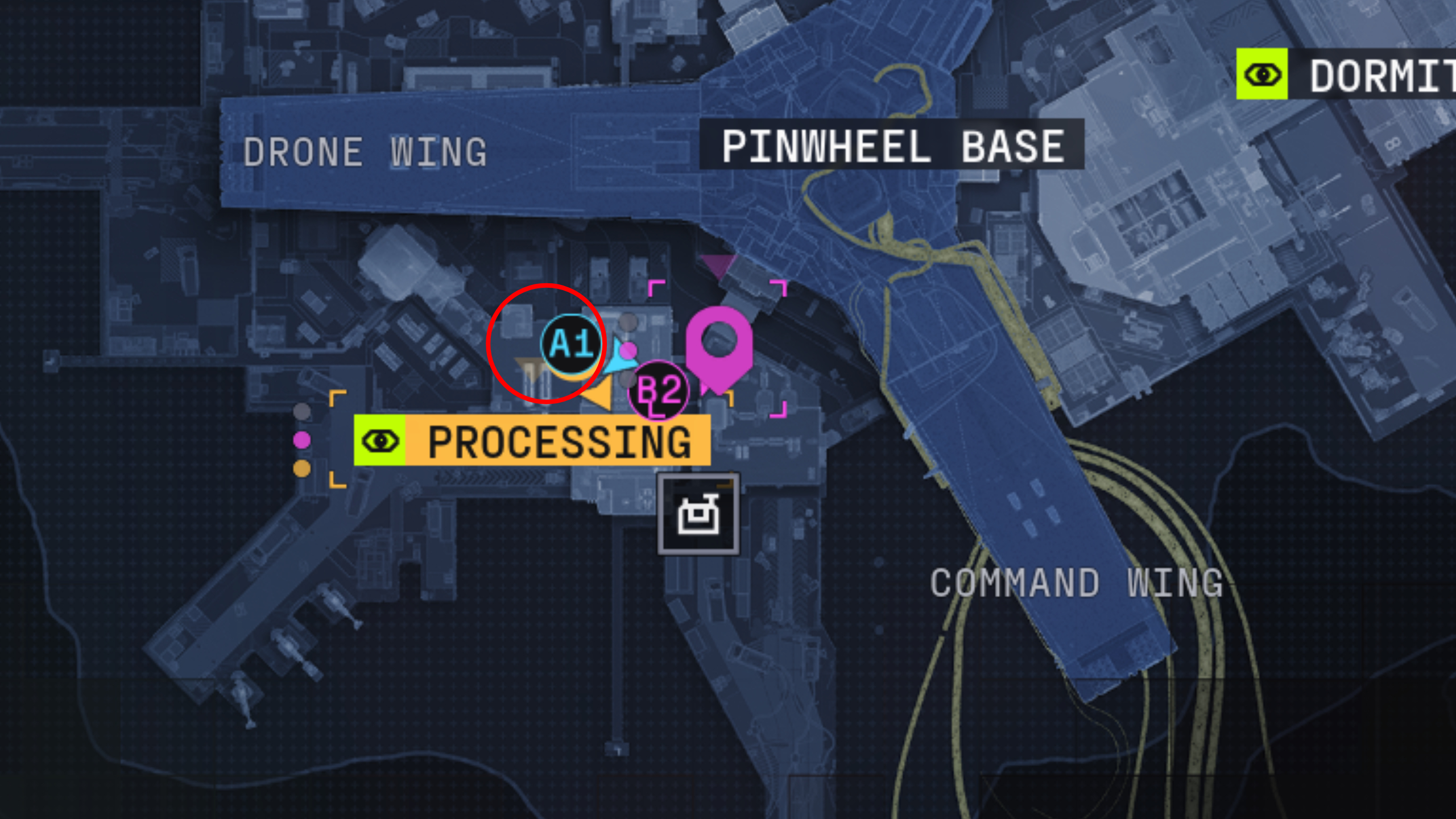
Marathon Protect/Destroy 4: A map of Outpost with a red circle showing the location of the terminal in Processing.
(Image credit: Bungie)

Your first port of call is the red terminal on the second floor, northwest side of the Processing building where all the conveyor belts are. The terminal in question is tucked into a dark corner next to a conveyor belt and not inside the control room like you might’ve thought.

Article continues below


You may like

Scan tagged containers in Airfield

As shown in the video above, there are four containers tagged with graffiti in Airfield, which you’ll need to interact with to scan:

  1. There’s one container directly ahead of you when you enter the east hangar from the west hangar (there’s a narrow walkway between them), in the centre of the open area
  2. Turn left when you enter the east hangar and walk north slightly to find this container against the wall
  3. Another container is next to the northeast exit of the east hangar, where it opens into the loading dock
  4. The final container is just a few steps north of the location above, further up the airfield
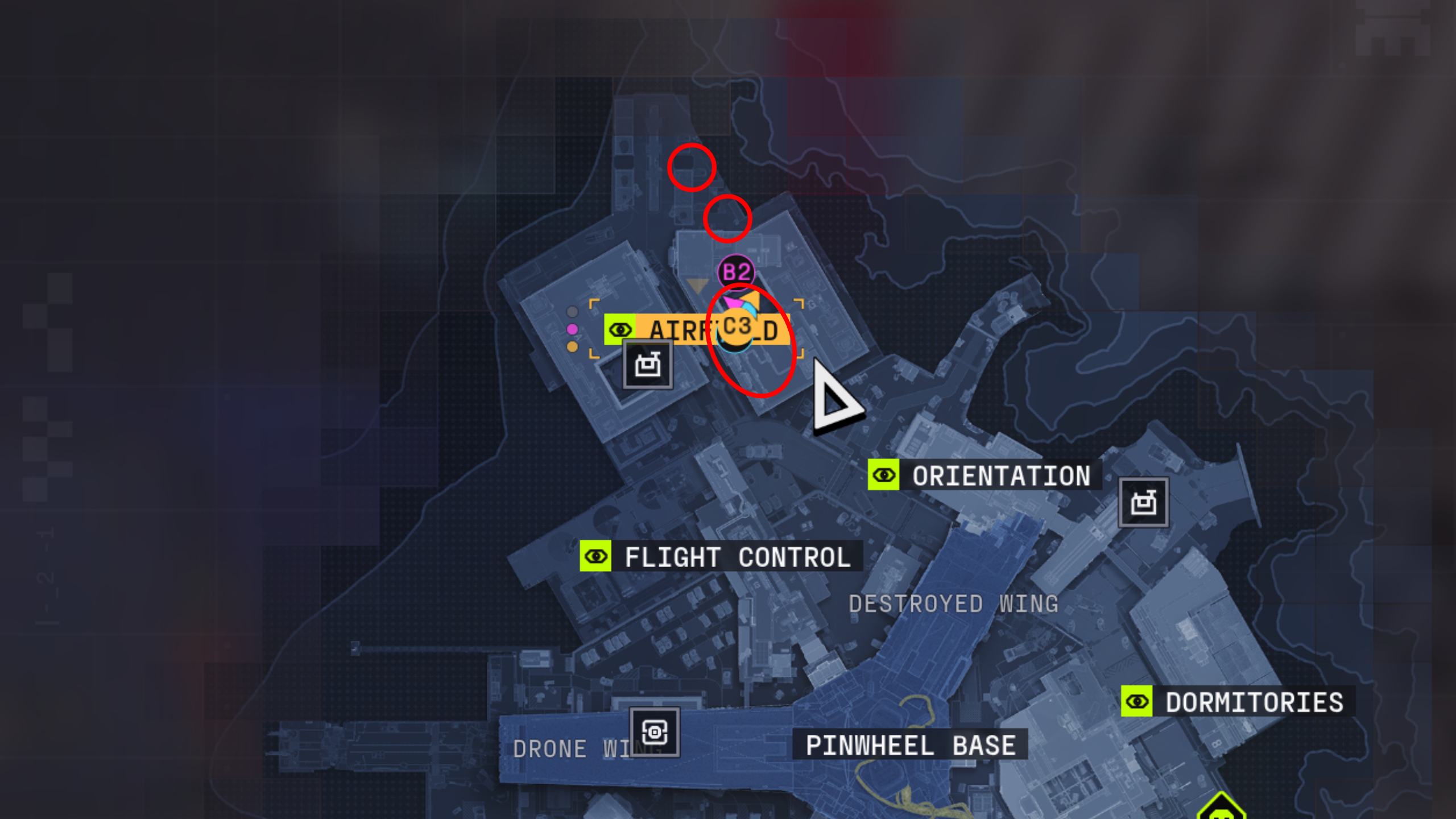
Marathon Protect/Destroy 4: A map of Outpost with three red circles showing the location of the tagged containers in Airfield.

(Image credit: Bungie)

Airfield is usually crawling with UESC bots and often other players, too, as it’s a spawn point and extraction, so don’t let your guard down.

Keep in mind that you’ll also need to avoid the Heat Cascade mechanic. If the ground is scorching outside, wait for it to pass before scanning the tagged containers in the loading bay north of the hangars to avoid taking damage.

Hack the terminal in Flight Control

Image 1 of 2
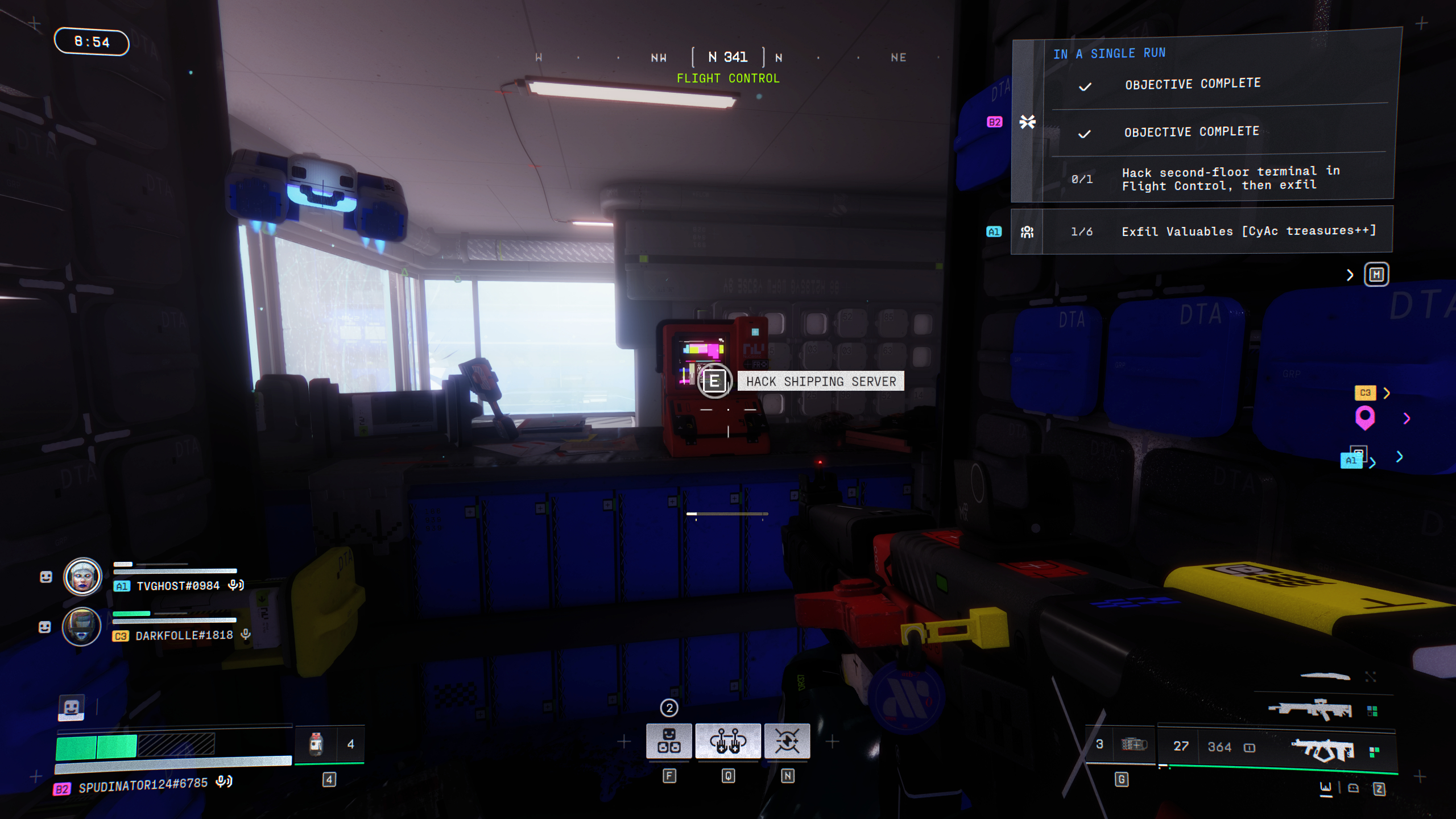
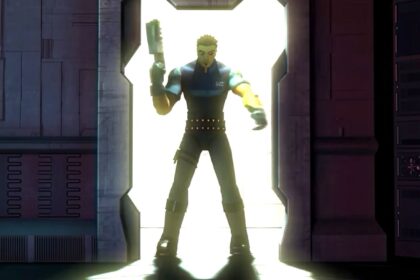
Marathon Protect/Destroy 4: A player looking at a red terminal in a dark room inside Flight Control.
(Image credit: Bungie)

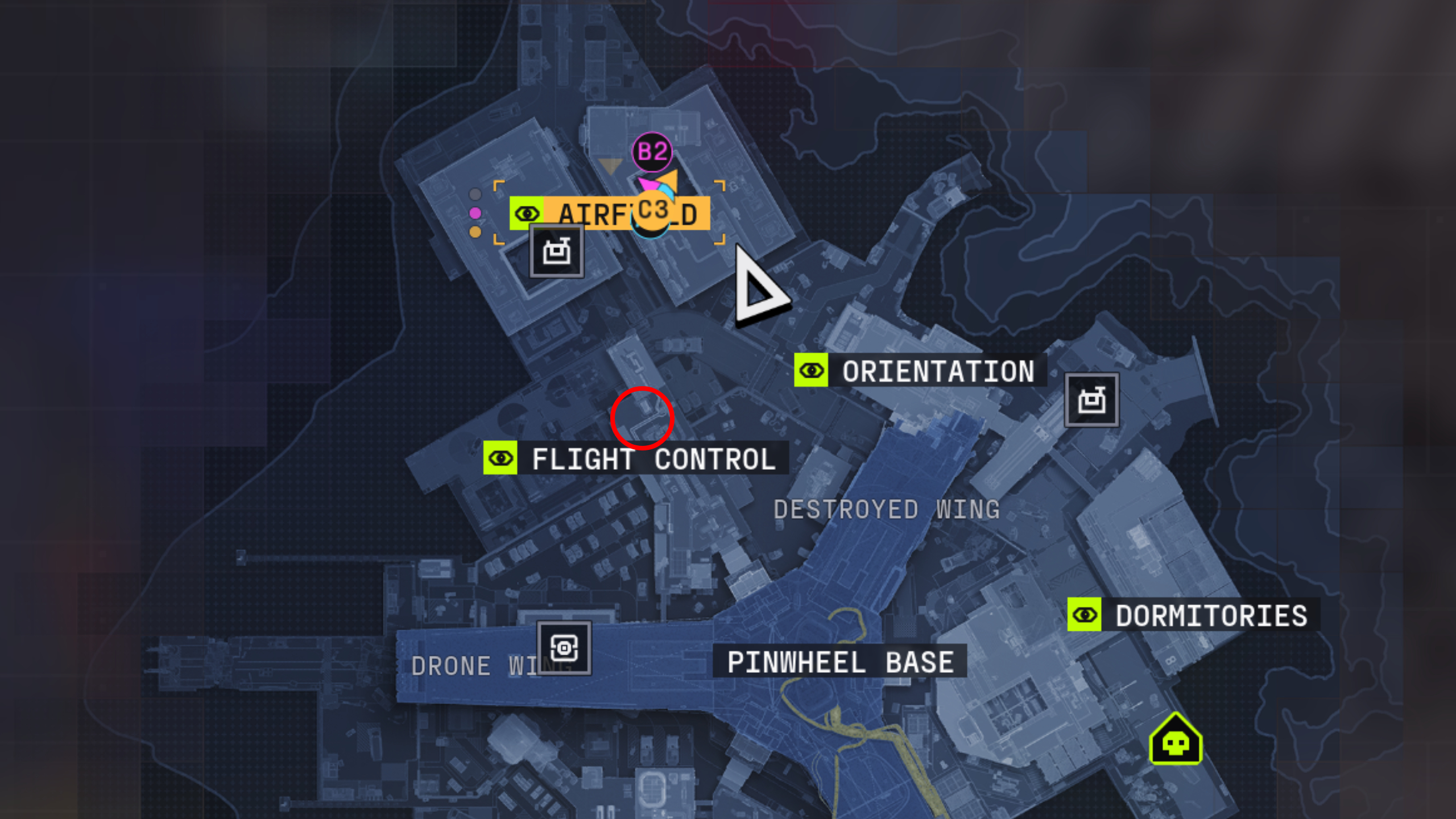
Marathon Protect/Destroy 4: A map of Outpost with a red circle showing the location of the terminal in Flight Control.
(Image credit: Bungie)

Now you need to scan another terminal, which is located in the second-floor data archive room in the north of Flight Control. It’s a red computer surrounded by blue server boxes near the large windows.

Keep up to date with the most important stories and the best deals, as picked by the PC Gamer team.

Importantly, you need to extract alive to complete Protect/Destroy 4 despite not having a quest item to bring back. Outpost is unique in that there are no standard crew exfill sites, so you’ll either need to head into the Pinwheel (this is dangerous) or take the guarded exfill (slightly less dangerous). Fail to extract alive, and you’ll have to restart the quest, whether you found the final quest objective terminal or not.

Read the full article here

You Might Also Like

The next Lego Batman recreates a memorable scene from the 1989 movie, complete with Prince soundtrack

Can you identify 15 RPGs in 4 minutes just from seeing one of their party companions?

Grim Dawn marks its 10th anniversary with a triumphal update on its final expansion: ‘Grim Dawn will not be going out with a bang, it will be a tremendous roar’

Citing Halo, FEAR, and Half-Life 2 as inspirations, Sprawl: Zero waves goodbye to boomer shooters and heralds the arrival of the Millennial FPS

Marvel Rivals is enacting ‘Victim Compensation Protocol’ for everyone who has been negatively affected by the incentivised throwing epidemic: ‘The system will automatically restore lost points’

Share This Article
Facebook Twitter Email Print
Leave a comment Leave a comment

Leave a Reply Cancel reply

Your email address will not be published. Required fields are marked *

- Advertisement -
Ad image

Trending Stories

News

Microsoft’s return-to-office policy creates a return to slower commutes, traffic analysis shows

March 10, 2026
Games

Clair Obscur: Expedition 33 studio say they’re seeking a ‘fair solution’ in dispute with comic artist who named his book after the same 15th century painting technique

March 10, 2026
Software

First reviews and analyst reactions – Computerworld

March 10, 2026
News

Judge blocks Perplexity’s AI bot from shopping on Amazon in early test of agentic commerce

March 10, 2026
Games

Nightdive re-announces the Sin remaster it un-announced 3 years ago

March 10, 2026
News

Opinion: You couldn’t pay me to leave Washington state, and I’d pay more to stay

March 10, 2026

Always Stay Up to Date

Subscribe to our newsletter to get our newest articles instantly!

Follow US on Social Media

Facebook Youtube Steam Twitch Unity

2024 © Prices.com LLC. All Rights Reserved.

Tech Journal Now

Quick Links

  • Privacy Policy
  • Terms of use
  • For Advertisers
  • Contact
Welcome Back!

Sign in to your account

Username or Email Address
Password

Lost your password?