SUBSCRIBE
Tech Journal Now
  • Home
  • News
  • AI
  • Reviews
  • Guides
  • Best Buy
  • Software
  • Games
  • More Articles
Reading: Where to find the terminals and tagged containers to complete Protect/Destroy 4 in Marathon
Share
Tech Journal NowTech Journal Now
Font ResizerAa
  • News
  • Reviews
  • Guides
  • AI
  • Best Buy
  • Games
  • Software
Search
  • Home
  • News
  • AI
  • Reviews
  • Guides
  • Best Buy
  • Software
  • Games
  • More Articles
Have an existing account? Sign In
Follow US
© Foxiz News Network. Ruby Design Company. All Rights Reserved.
Tech Journal Now > Games > Where to find the terminals and tagged containers to complete Protect/Destroy 4 in Marathon
Games

Where to find the terminals and tagged containers to complete Protect/Destroy 4 in Marathon

News Room
Last updated: March 10, 2026 2:44 pm
News Room
Share
4 Min Read
SHARE

MIDA’s Protect/Destroy 4 quest in Marathon sends you to Outpost, the most difficult and confusing of the three base maps. You don’t really get a second to take a look around, which is problematic when you need to find terminal locations and scan tagged containers in three different spots. Plus, it also takes bloody ages to run around the map, and you’ve only got 20 minutes to complete all three steps and extract.

But don’t worry, I’ll save you from the pain of getting shot while you’re carelessly running around looking for the objectives. Well, I can’t promise you won’t get shot in the back, but knowing where to look will help you complete Protect/Destroy 4 in no time.

Download the shipping manifest in Processing

Image 1 of 2
(Image credit: Bungie)

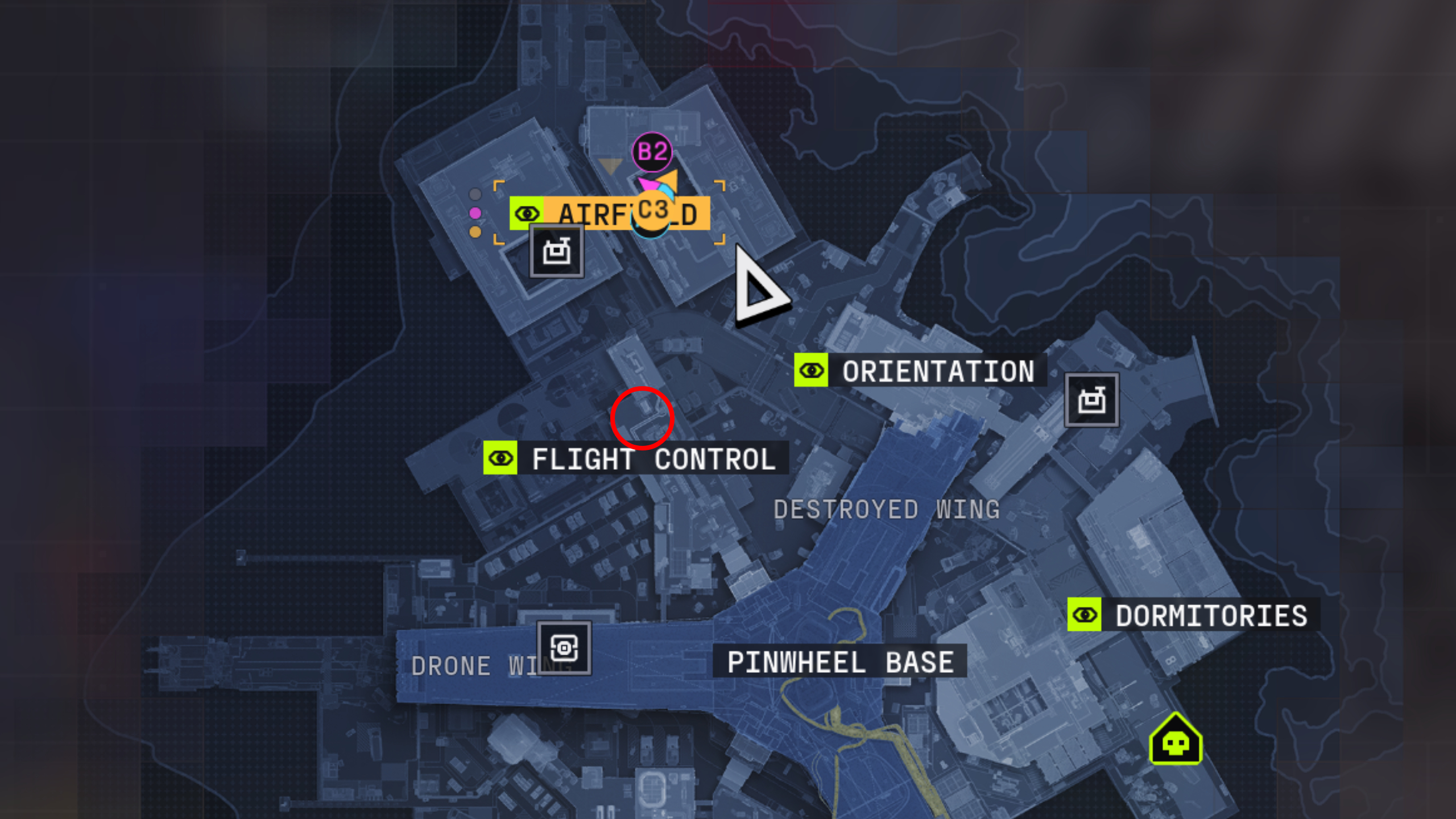
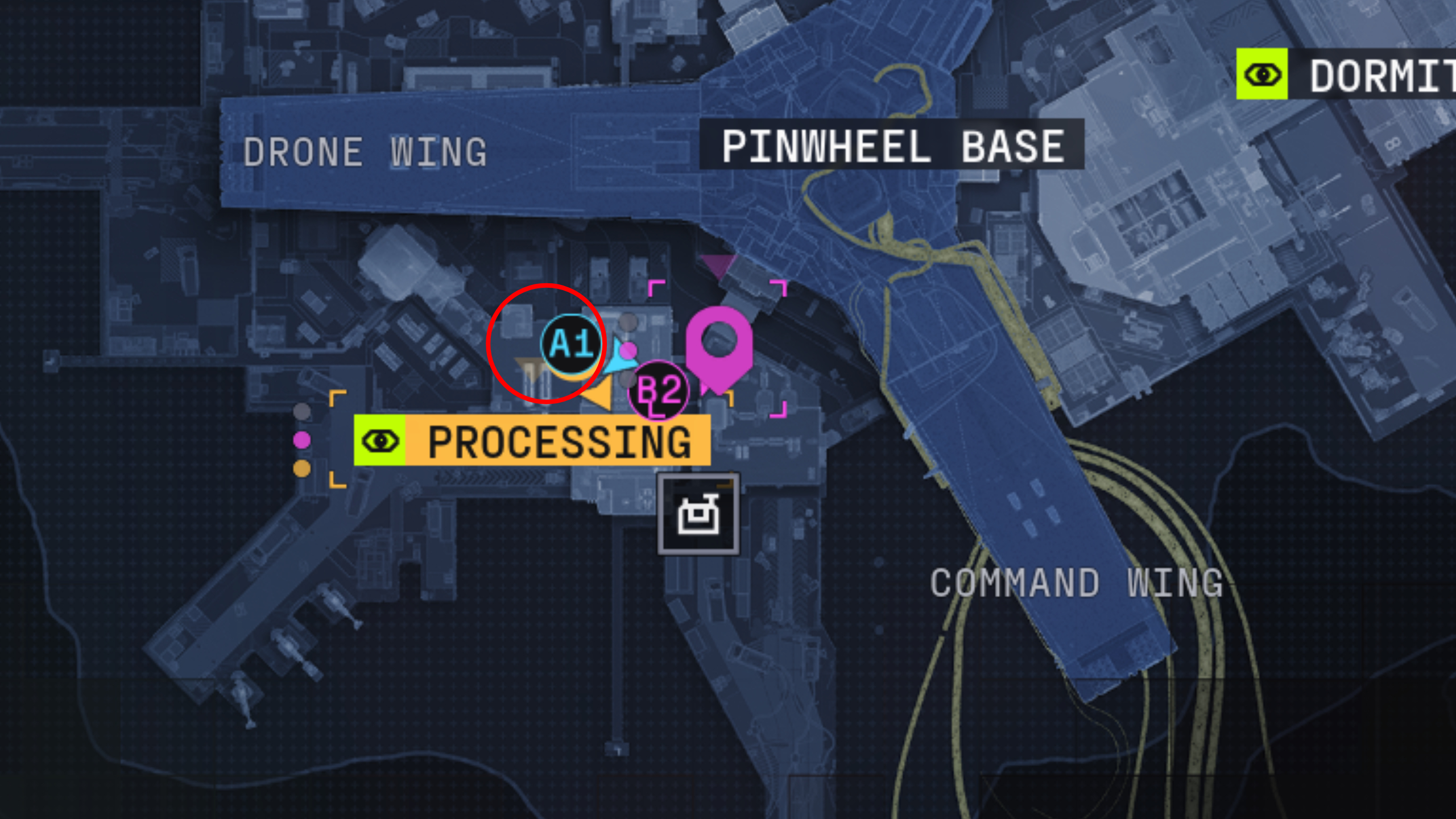
Marathon Protect/Destroy 4: A map of Outpost with a red circle showing the location of the terminal in Processing.
(Image credit: Bungie)

Your first port of call is the red terminal on the second floor, northwest side of the Processing building where all the conveyor belts are. The terminal in question is tucked into a dark corner next to a conveyor belt and not inside the control room like you might’ve thought.

Article continues below


You may like

Scan tagged containers in Airfield

As shown in the video above, there are four containers tagged with graffiti in Airfield, which you’ll need to interact with to scan:

  1. There’s one container directly ahead of you when you enter the east hangar from the west hangar (there’s a narrow walkway between them), in the centre of the open area
  2. Turn left when you enter the east hangar and walk north slightly to find this container against the wall
  3. Another container is next to the northeast exit of the east hangar, where it opens into the loading dock
  4. The final container is just a few steps north of the location above, further up the airfield
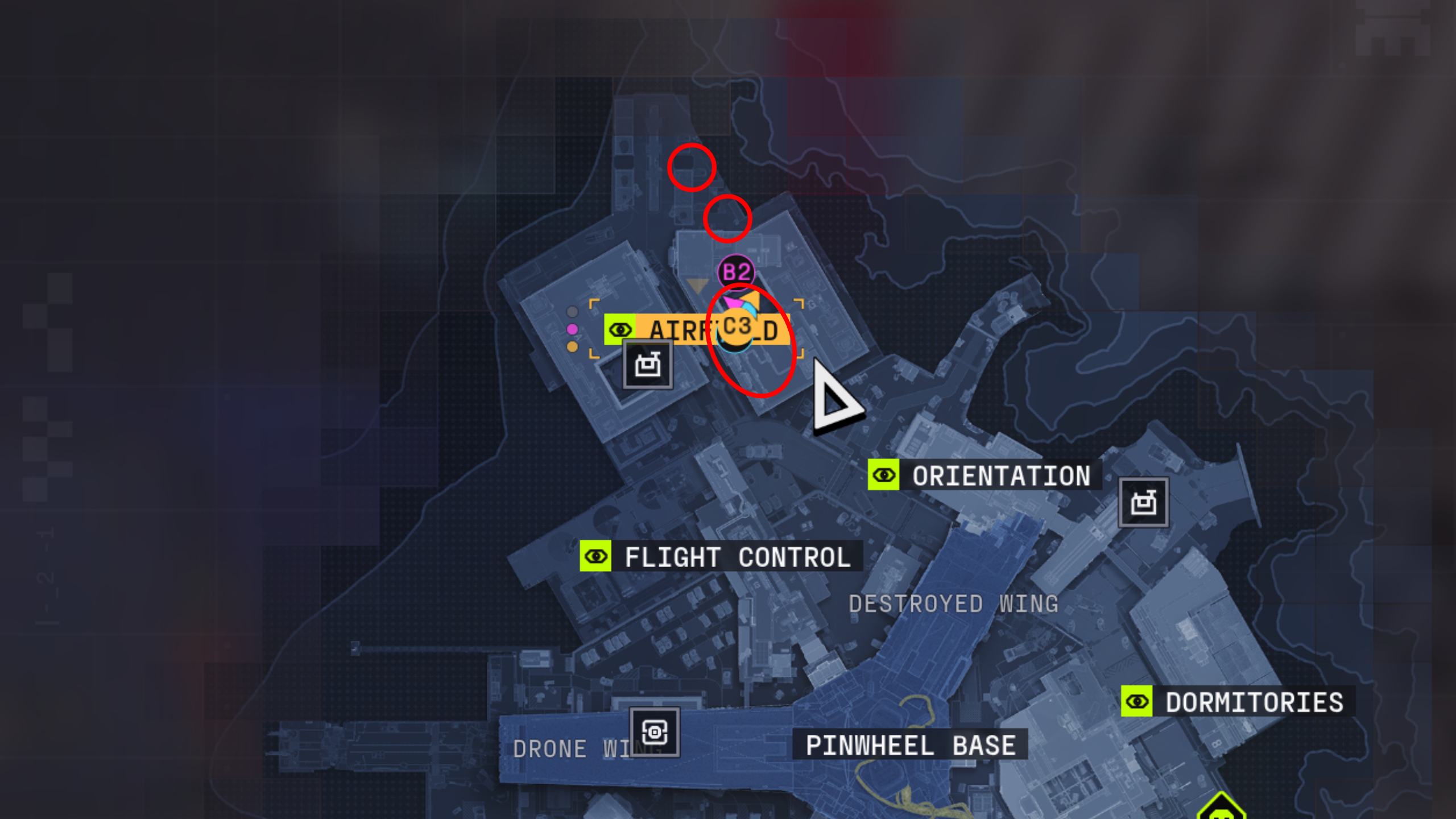
Marathon Protect/Destroy 4: A map of Outpost with three red circles showing the location of the tagged containers in Airfield.

(Image credit: Bungie)

Airfield is usually crawling with UESC bots and often other players, too, as it’s a spawn point and extraction, so don’t let your guard down.

Keep in mind that you’ll also need to avoid the Heat Cascade mechanic. If the ground is scorching outside, wait for it to pass before scanning the tagged containers in the loading bay north of the hangars to avoid taking damage.

Hack the terminal in Flight Control

Image 1 of 2
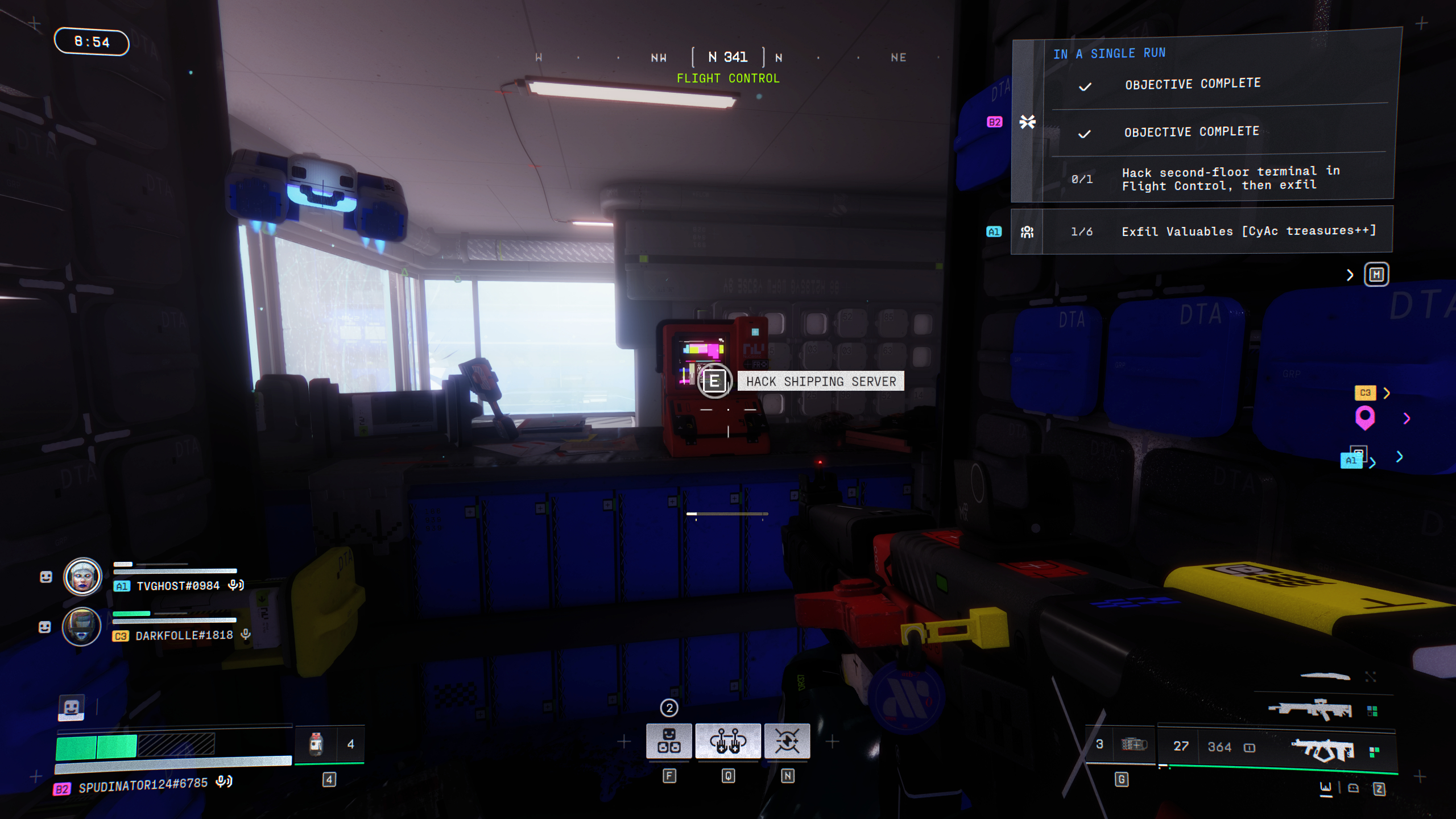
Marathon Protect/Destroy 4: A player looking at a red terminal in a dark room inside Flight Control.
(Image credit: Bungie)

Marathon Protect/Destroy 4: A map of Outpost with a red circle showing the location of the terminal in Flight Control.
(Image credit: Bungie)

Now you need to scan another terminal, which is located in the second-floor data archive room in the north of Flight Control. It’s a red computer surrounded by blue server boxes near the large windows.

Keep up to date with the most important stories and the best deals, as picked by the PC Gamer team.

Importantly, you need to extract alive to complete Protect/Destroy 4 despite not having a quest item to bring back. Outpost is unique in that there are no standard crew exfill sites, so you’ll either need to head into the Pinwheel (this is dangerous) or take the guarded exfill (slightly less dangerous). Fail to extract alive, and you’ll have to restart the quest, whether you found the final quest objective terminal or not.

Read the full article here

You Might Also Like

Heroic madlad is working multiplayer into Kingdom Come: Deliverance 2, and the brass ring of the whole thing is functional 2-player Farkle

About 30% of Arc Raiders players focus on PvE, and Embark’s happy with that: ‘We want to instil hope in the player’

At long last, fishing will finally come to RuneScape: Dragonwilds tomorrow, so I’ll wave goodbye to my other skills now

Marvel Rivals creative director says it’s going to become ‘a comprehensive Marvel “moving anime” experience’ and no, I don’t know what that means either

Death Stranding 2: On the Beach review

Share This Article
Facebook Twitter Email Print
Leave a comment Leave a comment

Leave a Reply Cancel reply

Your email address will not be published. Required fields are marked *

- Advertisement -
Ad image

Trending Stories

Games

I can’t stop winning with this Vampire Crawlers build that basically plays itself

April 24, 2026
Games

I don’t understand how Final Fantasy 14 can do a crossover with acclaimed anime Neon Genesis Evangelion and I’m scared to find out

April 24, 2026
Games

The release date for Path of Exile 2’s next expansion couldn’t be better for action RPG fans planning to play Diablo 4: Lord of Hatred first

April 24, 2026
Software

Former OpenAI research scientist launches new AI model for Tencent – Computerworld

April 24, 2026
Games

PSA: Crimson Desert’s new camera settings can make the game look like Baldur’s Gate 3

April 24, 2026
AI

Germany’s sovereign AI hope changes hands – Computerworld

April 24, 2026

Always Stay Up to Date

Subscribe to our newsletter to get our newest articles instantly!

Follow US on Social Media

Facebook Youtube Steam Twitch Unity

2024 © Prices.com LLC. All Rights Reserved.

Tech Journal Now

Quick Links

  • Privacy Policy
  • Terms of use
  • For Advertisers
  • Contact
Welcome Back!

Sign in to your account

Username or Email Address
Password

Lost your password?