JR Raphael, Foundry
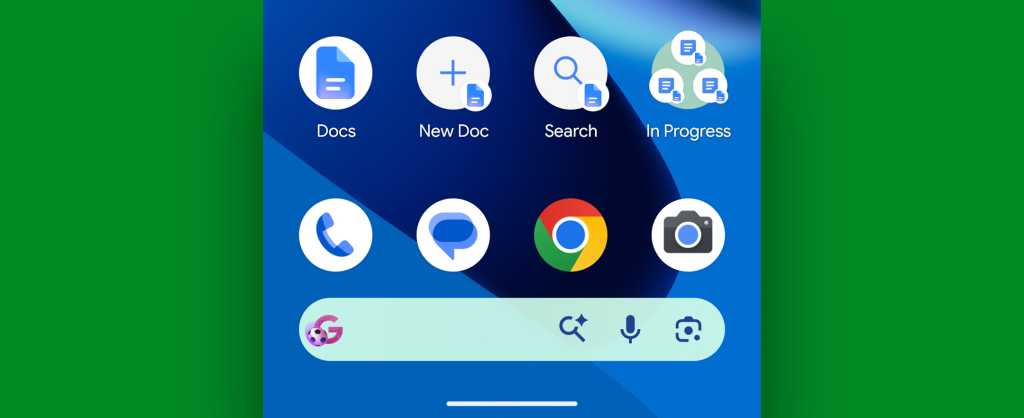
You can always get to those by long-pressing the Docs icon, but if you find yourself using the functions often, you can make it even easier by pressing and holding one of ’em within that pop-up menu and then dragging it directly onto your home screen for one-touch access.
You could even build yourself a nifty little Docs command center for super-fast access to all the stuff you use the most:
JR Raphael, Foundry
And while we’ve got easy access on our minds…
Google Docs Android feature #10: The offline on switch
By default, the Docs Android app will make any files you actively work within the app available for offline use for a while — but if you’re getting ready to travel or expecting any other connectivity-challenged moments, you don’t have to rely on its judgment to make sure your stuff is accessible even without internet access.
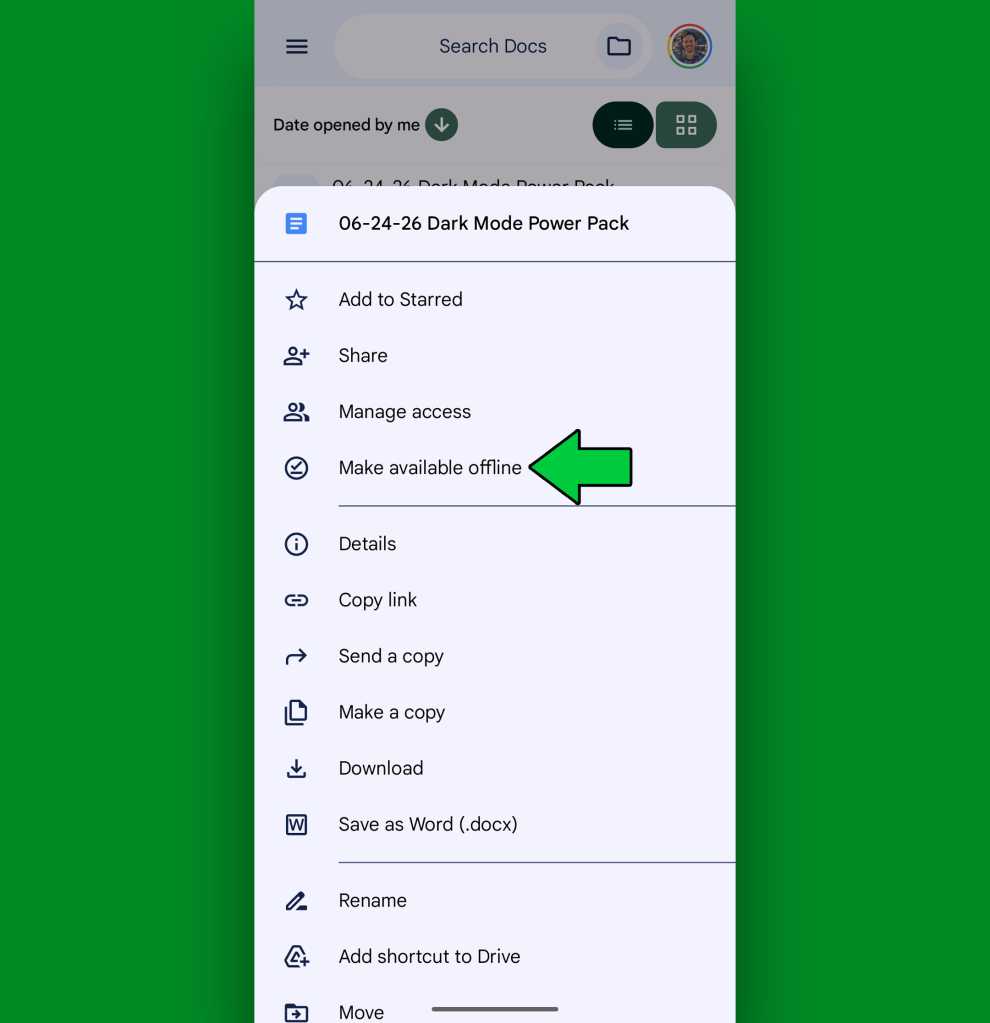
From the main Docs screen, tap the three-dot icon alongside any document name and then look for the “Make available offline” option within the menu that pops up.
JR Raphael, Foundry
Tap that for any document that you expect to need and then rest easy knowing it’ll be there and available for you — no matter your current connection status.
Google Docs Android feature #11: Wordless reactions
Sometimes, a picture really is worth a thousand words. Or at least a couple hundred.
That’s especially true when collaborating on a document and expressing your opinions — which, let’s be honest, often come down to simple reactions like 👍 or maybe 💩.
Docs has allowed emoji reactions as a part of its editing process for a while now, and at some point along the way, the Android app gained the same ability. It’s just weirdly tucked away in a place where few word-minded mammals would ever find it.
So do this: The next time you’re working on a shared doc, try pressing and holding your finger onto any word to highlight it. (You can then use the selector icons that pop up to expand or shift your selection, if needed.)
Now for the tricky part: In the menu that appears alongside your selection — the one that contains “Copy” and other such commands — look for the three-line icon at its far right side.

JR Raphael, Foundry
Tap that — and lookie what we have here: the awkwardly hidden option to add an emoji reaction! 🥳

JR Raphael, Foundry
Hit that sneaky little thing with all your might, then select the most appropriate reaction and move on with a satisfied 😊 in your mind.
Google Docs Android feature #12: Your in-doc AI
Generative AI these days is a bit of a mixed bag, to put it politely. Google’s Gemini and other such services are arguably causing more harm than good, on numerous levels, and also just creating paths for lazy, low-quality and accuracy-challenged work.
But in the right scenario and with the right sort of framing, Gemini-style AI can actually be useful. The onus just falls squarely on you to determine how to most effectively use it and avoid falling into the traps of unoriginality or, worse, inaccuracy.
The Docs Android app now offers a direct shortcut to Gemini within its editing interface — via the starburst-shaped icon in the toolbar at the top of the screen — and with some careful considering, it might just end up being a helpful reading or editing tool for you.
A few suggestions that notably don’t involve having AI write lazy, uninspired copy on your behalf:
- You can use the Gemini in Docs system as a quick ‘n’ easy way to get a definition or list of synonyms for any word in front of you.
- You can also use it to ask for context or related information — like an integrated research aide. (Just remember that AI doesn’t always get things right, so treat it as more of a starting point than a final quote-ready answer.)
- And you can lean on it to perform tasks like summarizing or outlining a long document or helping you reorganize a document into a more logical state.
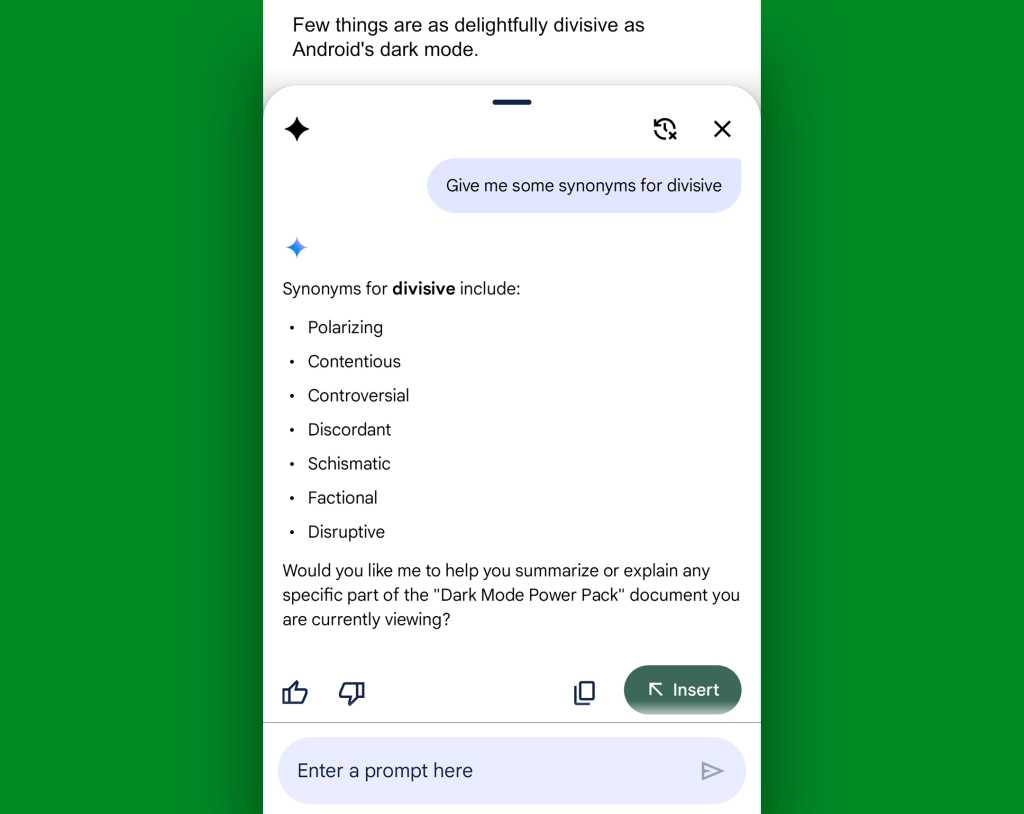
JR Raphael, Foundry
You may still end up spending a ton of time in Docs, but at least now you’ll make the most of every second there and avoid wasting your effort on piddly little tasks that can be made more efficient. And that, as far as I’m concerned, warrants an enthusiastic 🥂 reaction — maybe even followed by a well-earned 🍪.
Get six full days of advanced Android knowledge with my free Android Shortcut Supercourse. You’ll learn tons of time-saving tricks for your phone!
Read the full article here