SUBSCRIBE
Tech Journal Now
  • Home
  • News
  • AI
  • Reviews
  • Guides
  • Best Buy
  • Software
  • Games
  • More Articles
Reading: How to tag marked locations to complete Protect/Destroy in Marathon
Share
Tech Journal NowTech Journal Now
Font ResizerAa
  • News
  • Reviews
  • Guides
  • AI
  • Best Buy
  • Games
  • Software
Search
  • Home
  • News
  • AI
  • Reviews
  • Guides
  • Best Buy
  • Software
  • Games
  • More Articles
Have an existing account? Sign In
Follow US
© Foxiz News Network. Ruby Design Company. All Rights Reserved.
Tech Journal Now > Games > How to tag marked locations to complete Protect/Destroy in Marathon
Games

How to tag marked locations to complete Protect/Destroy in Marathon

News Room
Last updated: March 6, 2026 4:40 pm
News Room
Share
4 Min Read
SHARE

Once you complete Order/Chaos for MIDA in Marathon, Gantry will give you the Protect/Destroy contract, which has five steps. In the trickiest one, Protect/Destroy 3, you need to tag marked locations across Dire Marsh. In other words, paint some MIDA propaganda to spite Orion.

Your artistic ability aside, tagging the marked locations is one of the most vague and confusing objectives across all of Marathon’s early quests, and the in-game hint isn’t much help. Below, I’ll explain how to complete Protect/Destroy 3, including where to find the marked locations you need to tag.

How to tag marked locations to complete Protect/Destroy in Marathon

Image 1 of 2
(Image credit: Bungie)

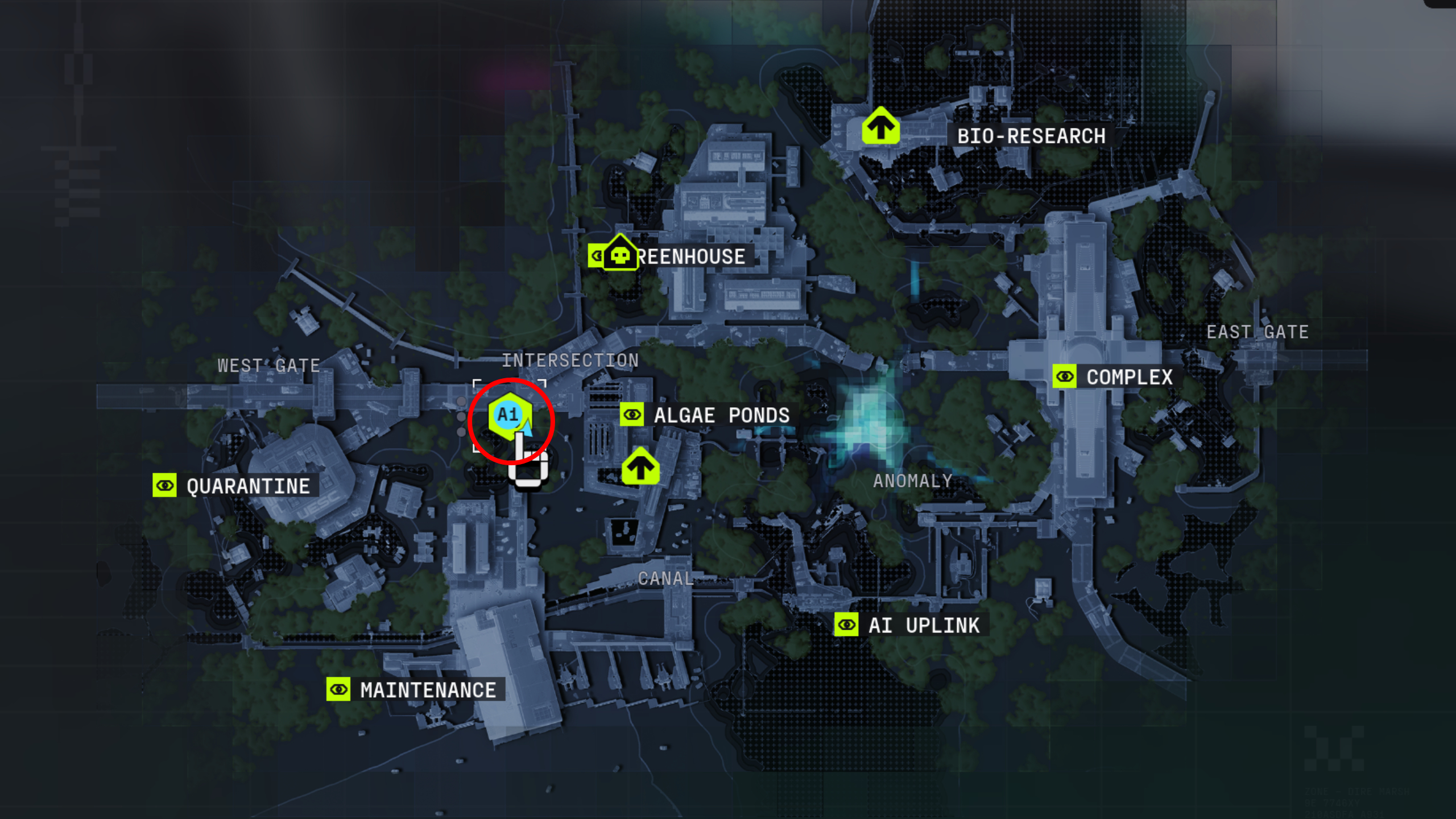
Marathon Protect/Destroy 3: A map of Dire Marsh with a red circle showing the location of the UV Protocol in Intersection.
(Image credit: Bungie)

The first step in Protect/Destroy 3 is to install the UV Protocol from the secure room in the southwest of Intersection. As the objective alludes to, you need to break into the locked, blue building in the southwest corner Intersection by shooting the four power boxes. Three are located on the exterior walls, and one is inside above the doorway. Then all you need to do is head upstairs, examine the cabinet, and collect the UV Protocol.


You may like

Now, you need to tag three marked locations in either Complex, Maintenance, or AI Uplink. I recommend tagging the locations in Maintenance since it’s closest to Intersection, and you need to complete this contract in a single run. You’re more likely to get shot if you decide to run halfway across the swamp.

Image 1 of 4
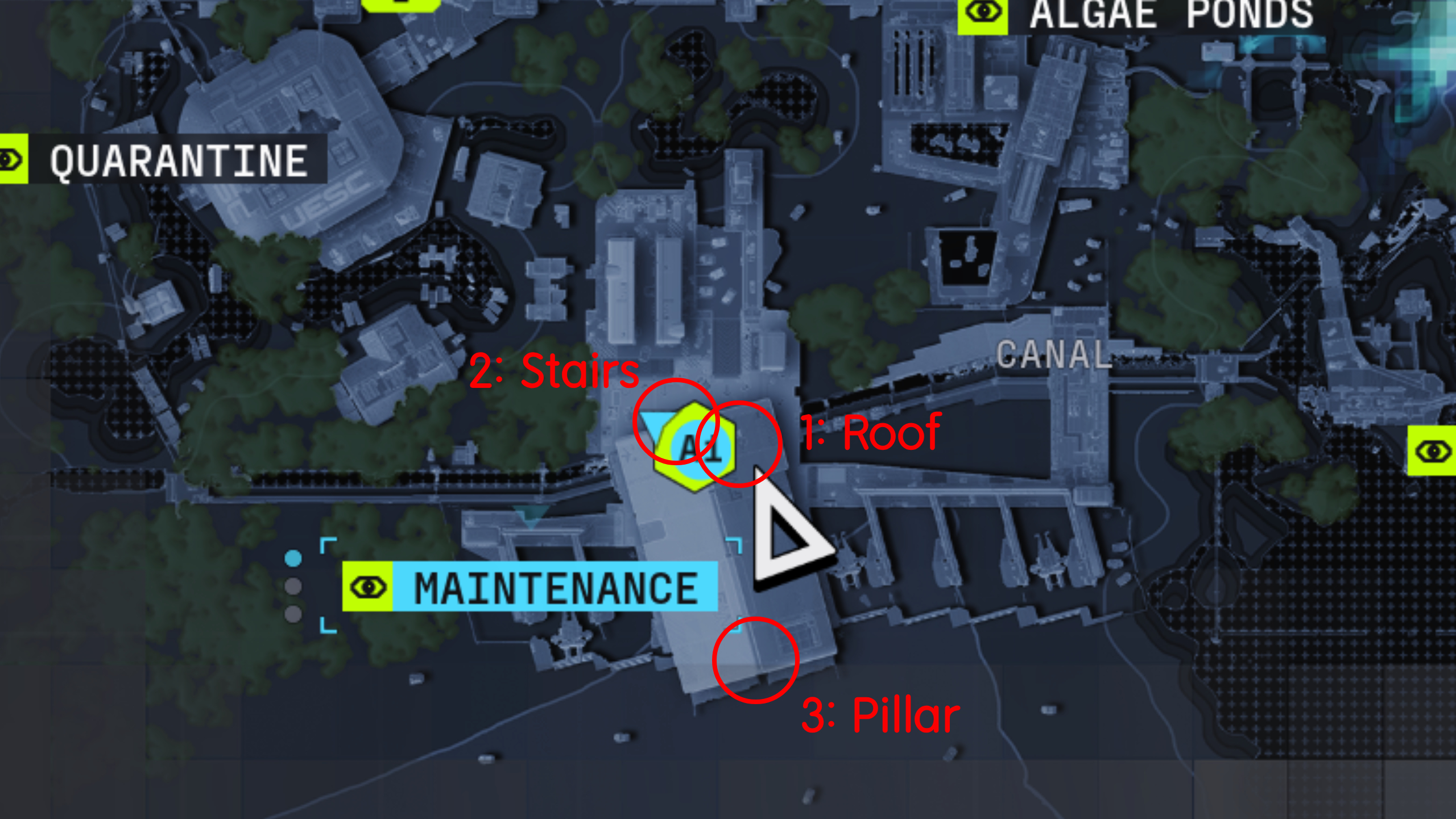
Marathon tag marked locations: An annotated map showing where the marked locations you need to tag in Maintenance on Dire Marsh.
(Image credit: Bungie)

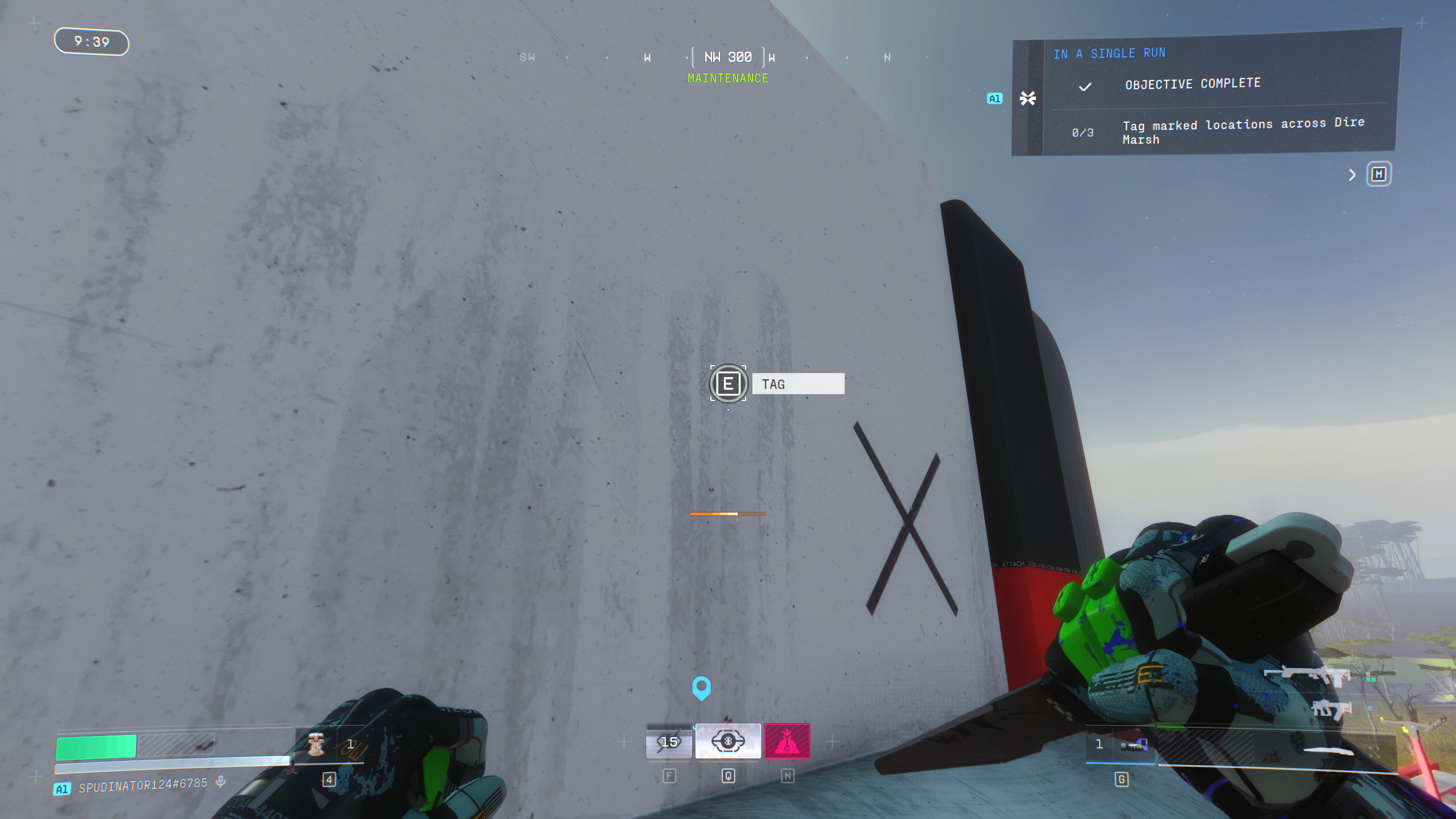
Marathon tag marked locations: A player looking at a white wall with a black 'X' on it on the roof of Maintenance.
Northeast side of the roof.(Image credit: Bungie)

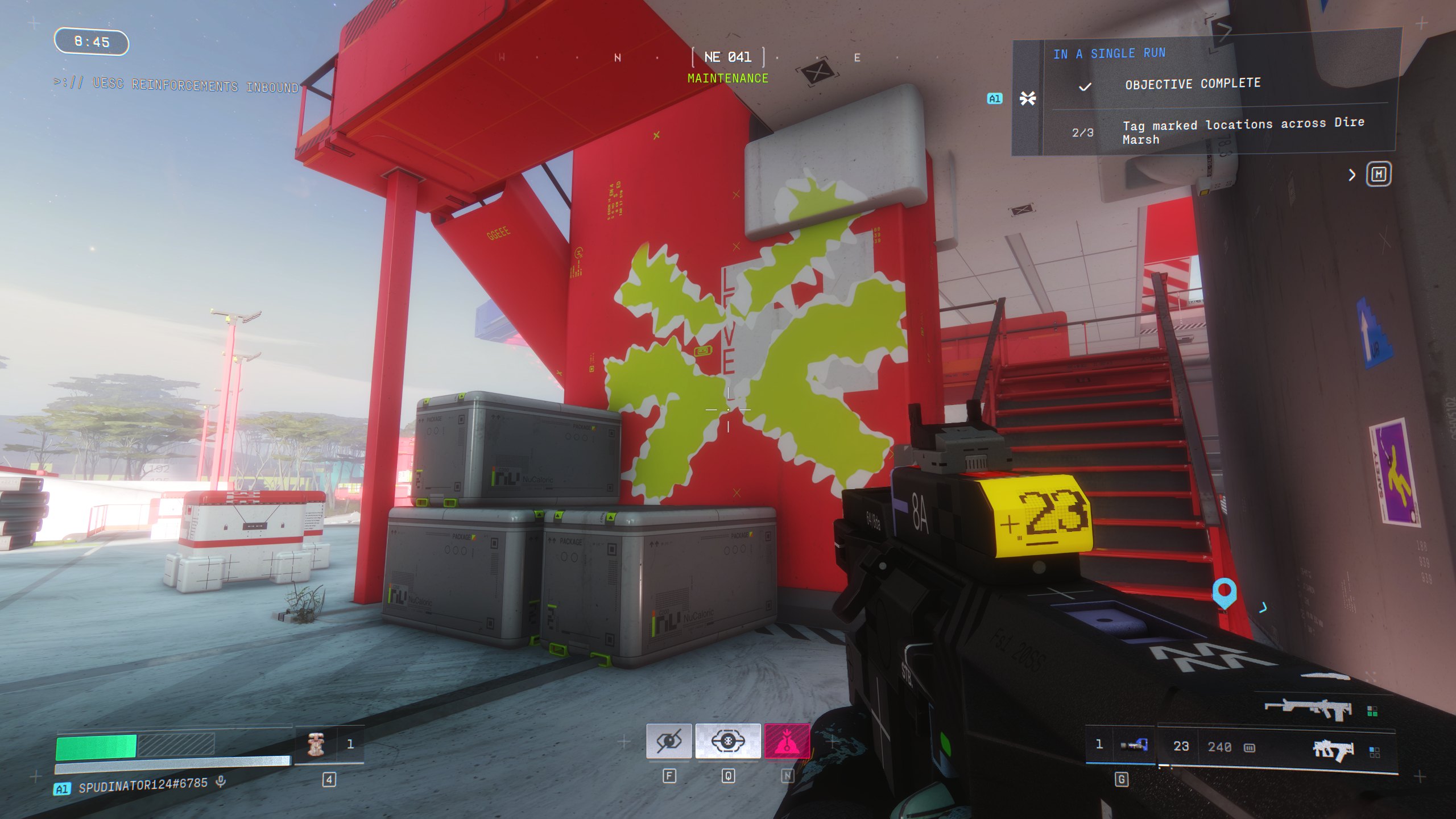
Marathon tag marked locations: A player looking at a red pillar by a staircase, with MIDA's symbol painted on.
Northern entrance stairs.(Image credit: Bungie)

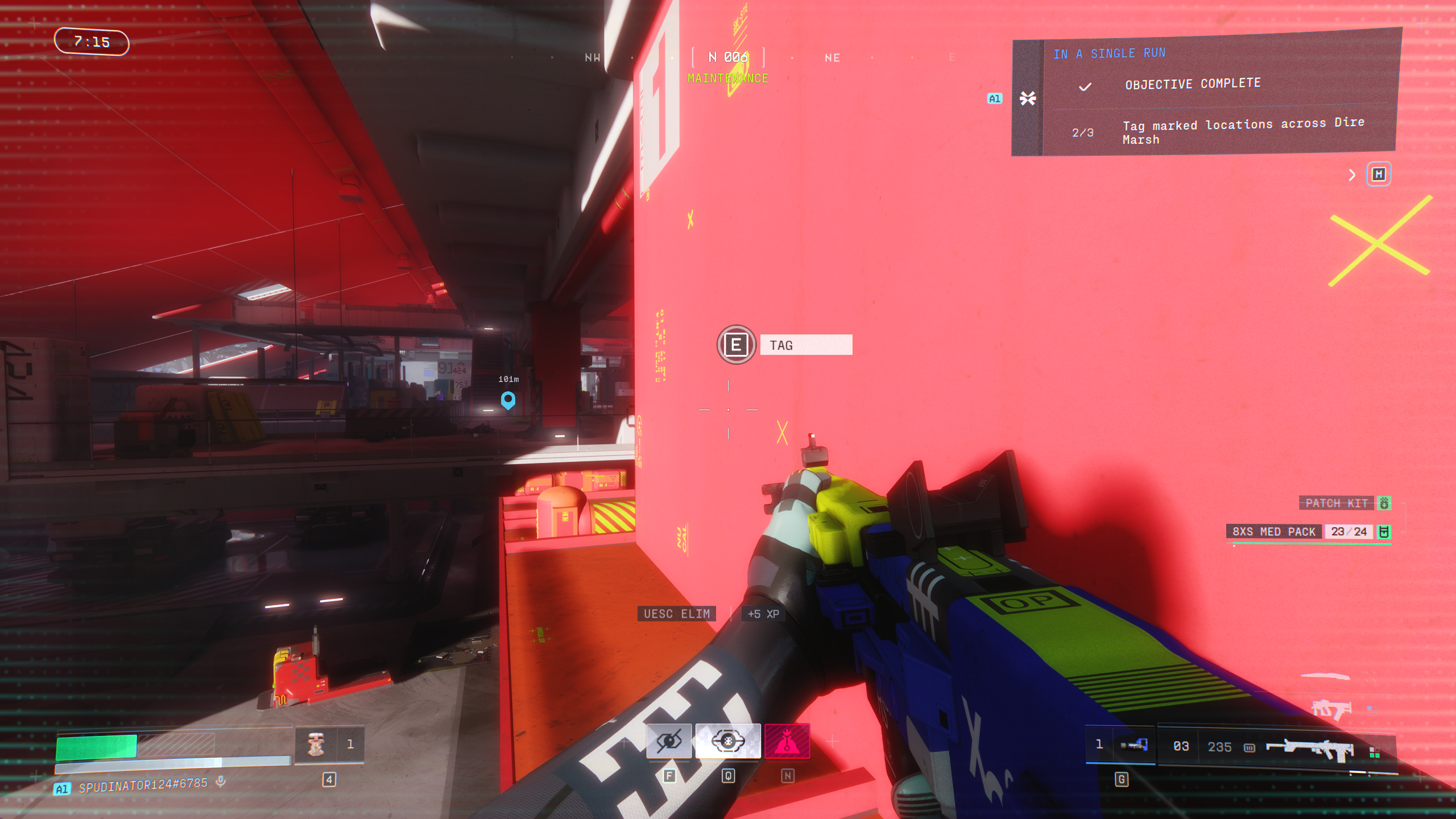
Marathon tag marked locations: A player looking at the red pillar in the hangar area of Maintenance.
Southern entrance pillar.(Image credit: Bungie)

The specific locations you’re looking for are blank walls, which will only be marked on your HUD when you’re close enough. In Maintenance, find and tag the marked locations below:

  1. On the northeastern side of the roof: Walk up the sloped roof on the east side and head to the north end, where you can tag the wall dividing both halves of the roof overlooking the cargo area to the north.
  2. On the red pillar between the staircase at the north entrance: In the centre of the northern entrance, you’ll see a red staircase leading to the upper walkways. You can tag the wall supporting the stairs, next to the three large crates.
  3. On the pillar at the south entrance: In the hangar bay to the south, where Maintenance opens to the swamp, you’ll see a large pillar in the centre supporting the roof. You need to reach the ledge halfway up the pillar, so jump up the small walls to the side and climb up.

Tag all three of these locations, and you’ll have completed Protect/Destroy 3 even if you don’t manage to successfully extract afterwards. You need to do all these steps in a single run. So if you die in the middle you’re forced to restart the contract. Maintenance can be a dangerous place for both PvE and PvP, so keep your wits about you.

Keep up to date with the most important stories and the best deals, as picked by the PC Gamer team.

Read the full article here

You Might Also Like

Even after ZA/UM’s messy breakup, the writing team still has a cadre of sad communists—but you won’t have to play Zero Parades as one if you don’t want to

A Pokopia player has spent 260 hours over 22 days recreating an underground Cyberpunk city: ‘I swear to god, you people aren’t human’

Former EA chief Peter Moore says his game industry style of PR irritated his bosses at Liverpool FC, and that’s partly why he’s not the CEO of Liverpool FC anymore

Reigns: The Witcher review | PC Gamer

Somehow a movie that gave me nightmares as a kid has been turned into the delightful Metroidvania palate cleanser I needed after Silksong

Share This Article
Facebook Twitter Email Print
Leave a comment Leave a comment

Leave a Reply Cancel reply

Your email address will not be published. Required fields are marked *

- Advertisement -
Ad image

Trending Stories

News

Microsoft quantum lead joins IonQ; Heptio co-founder now CTO at Stacklok

April 21, 2026
Games

Combing through a house full of a dead loved one’s possessions to figure out who they were feels like the anti-Unpacking

April 21, 2026
Games

How to fish in Runescape: Dragonwilds

April 21, 2026
AI

With John Ternus as CEO, expect Apple’s platforms to proliferate – Computerworld

April 21, 2026
News

Experts Warn AI Could Deepen Income Inequality

April 21, 2026
Games

Crimson Desert’s story is nonsensical and barely-there, but Kliff’s mocap actor reckons ‘what it lacks in narrative it more than makes up for in other aspects’

April 21, 2026

Always Stay Up to Date

Subscribe to our newsletter to get our newest articles instantly!

Follow US on Social Media

Facebook Youtube Steam Twitch Unity

2024 © Prices.com LLC. All Rights Reserved.

Tech Journal Now

Quick Links

  • Privacy Policy
  • Terms of use
  • For Advertisers
  • Contact
Welcome Back!

Sign in to your account

Username or Email Address
Password

Lost your password?